

An XML sitemap is a file that lists a website’s essential pages, ensuring that search engines can find and crawl them all.
This is particularly important for WordPress websites, which often feature numerous dynamic pages, categories, and tags that can be missed by search engine crawlers.
The XML format is specifically structured to make this information digestible for search engines, aiding in the proper indexing of a site.

For a WordPress site owner, having an XML sitemap is a fundamental component of SEO (Search Engine Optimisation). Without one, search engines might overlook important parts of your site, potentially impacting your visibility in search results.
Benefits of Using an XML Sitemap
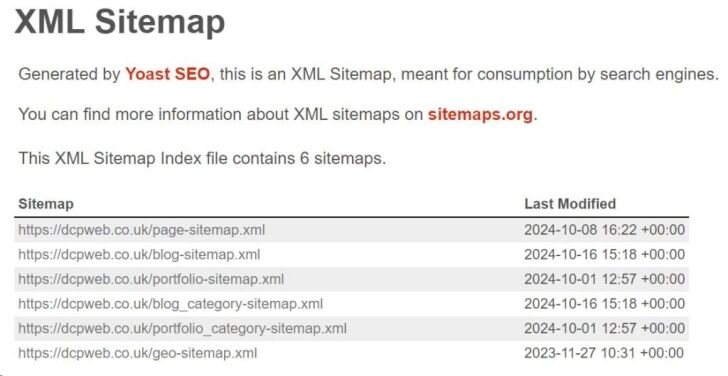
Implementing an XML sitemap on your WordPress site comes with a range of advantages that enhance your site’s visibility and accessibility. Here are some of the main benefits:
- Improved Search Engine Indexing: An XML sitemap acts like a roadmap for search engine bots, guiding them to your most important content. This is particularly useful for large websites with complex structures, new sites that might not have many backlinks, or websites with extensive media content.
- Faster Content Discovery: When you publish new content, search engines may take time to find it organically. An XML sitemap helps notify search engines about changes or additions, speeding up the process of content discovery.
- Enhanced Crawl Efficiency: By providing a clear list of URLs, an XML sitemap can help search engines prioritise which parts of your site to crawl first. This can be especially beneficial for sites that update content frequently or have deep website hierarchies.
- Detailed Metadata: Sitemaps can include valuable information like the date a page was last updated, its priority in relation to other URLs on the site, and how often it changes. This metadata helps search engines make better indexing decisions.
- Support for Rich Media and Specialised Content: If your site contains videos, images, or news articles, sitemaps can be extended to include additional data for these elements. This helps search engines understand and index multimedia content more effectively.
Popular WordPress Plugins for Creating XML Sitemaps
For WordPress users, creating an XML sitemap can be simplified with plugins. These plugins not only generate sitemaps, but often come with additional SEO tools to optimise your site further. Here are three popular plugins for creating sitemaps:
1. Yoast SEO

- Overview: Yoast SEO is one of the most popular SEO plugins for WordPress, known for its comprehensive features. It includes a built-in XML sitemap generator, which can be enabled with just a few clicks.
- Features:
- Automatic XML sitemap creation and updates.
- Customisable settings to exclude specific types of content.
- Integration with advanced SEO tools like readability checks and keyword optimisation.
- How to Enable: Once installed and activated, go to “SEO” > “General” > “Features” and toggle the XML sitemap feature to “On.”
2. Rank Math

- Overview: Rank Math is a versatile SEO plugin that offers a robust set of tools, including an XML sitemap generator. It’s known for being user-friendly and lightweight, making it a popular choice among beginners and advanced users alike.
- Features:
- Auto-updating sitemaps that include posts, pages, categories, and more.
- Support for video and news sitemaps.
- Options to prioritise and exclude content.
- How to Enable: Navigate to “Rank Math” > “Sitemap Settings” and ensure that the sitemap functionality is activated and customised as needed.
3. All in One SEO (AIOSEO)

- Overview: All in One SEO is another comprehensive SEO solution that includes an XML sitemap generator. It’s particularly user-friendly and has extensive documentation and support.
- Features:
- Configurable sitemaps for posts, pages, categories, and custom post types.
- Support for additional sitemap types like video and RSS.
- Real-time updates to ensure that search engines are always aware of new content.
- How to Enable: After installing and activating the plugin, go to “All in One SEO” > “Sitemaps” to customise the settings and enable sitemap generation.
How to Add Your Sitemap to Google Search Console
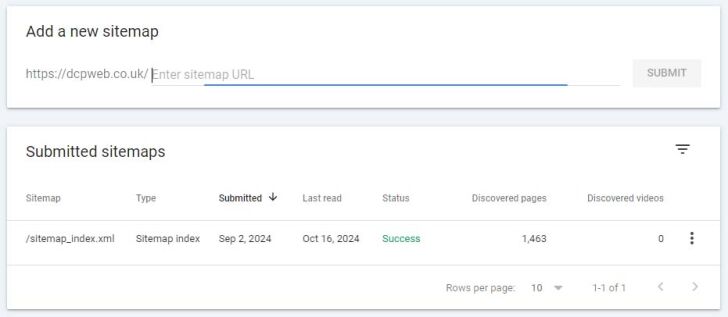
Google Search Console is a free tool provided by Google that helps website owners monitor and maintain their site’s presence in Google Search results. Adding your sitemap to Google Search Console ensures that Google can crawl and index your site more effectively.
Steps to Add a Sitemap to Google Search Console:
- Log in to Google Search Console: Visit Google Search Console and sign in with your Google account.
- Select Your Property: Choose the website property you want to add the sitemap to. If your website is not already listed, you’ll need to add it and verify ownership.
- Navigate to the Sitemap Section: In the left-hand menu, click on “Sitemaps.”
- Submit Your Sitemap: Enter the URL of your sitemap (e.g., https://www.yourdomain.com/sitemap_index.xml) and click “Submit.”
- Check the Status: Once submitted, Google will begin to process the sitemap. You can check back later to see if any errors occurred during the crawl.
How to Add Your Sitemap to Bing Webmaster Tools
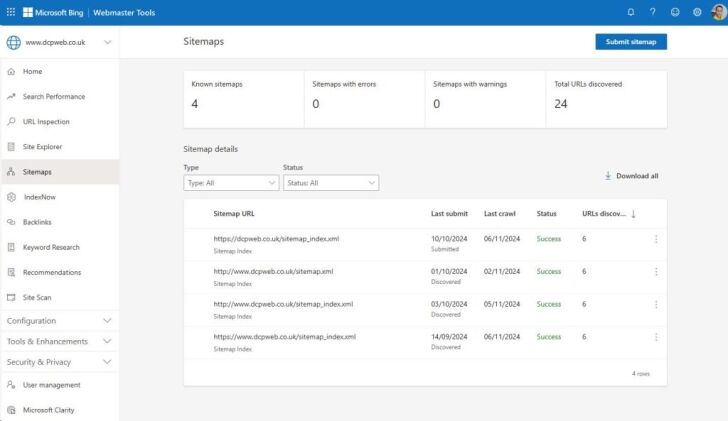
Similar to Google Search Console, Bing Webmaster Tools helps website owners understand and improve their site’s performance in Bing search results. Adding your sitemap here can further broaden your site’s visibility.
Steps to Add a Sitemap to Bing Webmaster Tools:
- Log in to Bing Webmaster Tools: Visit Bing Webmaster Tools and sign in using your Microsoft, Google, or Facebook account.
- Select Your Property: Choose the site property you wish to manage. If it’s not listed, add your site and go through the verification process.
- Navigate to the Sitemap Section: Click on “Sitemaps” in the left sidebar.
- Submit Your Sitemap: Enter your sitemap URL (e.g., https://www.yourdomain.com/sitemap_index.xml) and click “Submit.”
- Monitor Sitemap Status: Bing will process the sitemap and provide feedback on any detected issues. Regularly check this section to ensure your site’s pages are being indexed correctly.
Conclusion
An XML sitemap is an indispensable tool for improving your WordPress site’s SEO by helping search engines find, crawl, and index your content efficiently.
Plugins like Yoast SEO, Rank Math, and All in One SEO simplify the process, making it easy to generate and manage your sitemaps. By submitting your sitemap to both Google Search Console and Bing Webmaster Tools, you ensure that your site’s content is properly indexed and reaches a wider audience.
Regularly monitoring and updating your sitemap can further enhance the SEO health of your site, ultimately driving more organic traffic and improving your online visibility.



