

Optimising your WooCommerce store for search engines is critical for driving organic traffic, improving visibility, and ultimately increasing sales. Search Engine Optimisation (SEO) is an ongoing process, but with the right strategies, your WooCommerce website can rank high in Google and other search engines in 2026.
This ultimate WooCommerce SEO checklist will guide you through the essential steps to ensure your online store is fully optimised for maximum search engine performance.
1. Choose an SEO-Friendly Hosting Provider

A fast and reliable hosting provider is the foundation of your WooCommerce SEO strategy. Search engines prioritise websites with quick loading speeds and minimal downtime.
Key Considerations:
- Speed: Opt for hosting providers that offer optimised servers for WooCommerce.
- Uptime: Ensure the hosting provider has a track record of 99.9% uptime or higher.
- SSL Certificate: Secure your site with HTTPS (SSL encryption), as it’s a ranking factor for Google.
Recommended Hosting Providers:
- SiteGround: Known for WooCommerce-specific optimisation.
- Kinsta: Offers managed WordPress hosting with excellent performance.
- Bluehost: Officially recommended by WordPress.
2. Use an SEO-Friendly WooCommerce Theme
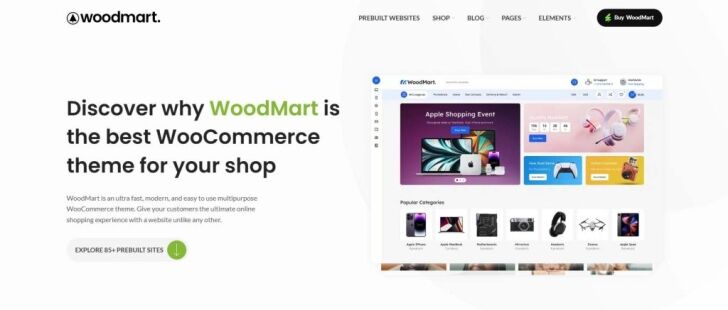
Your theme plays a significant role in how search engines and users perceive your website. A well-coded, SEO-optimised theme can enhance your rankings.
Key Features to Look For:
- Lightweight and fast loading.
- Mobile responsiveness (essential for mobile-first indexing).
- Structured data (schema markup) integration.
Recommended Themes:
- Astra
- Flatsome
- OceanWP
Pro Tip: Test your theme using Google’s Mobile-Friendly Test and PageSpeed Insights to ensure it meets SEO standards.
3. Configure Permalinks for Clean URLs

WooCommerce allows you to configure your permalinks (URL structure) for better SEO. Clean, keyword-rich URLs improve click-through rates and rankings.
Steps to Optimise Permalinks:
- Go to Settings > Permalinks in your WordPress dashboard.
- Select the Post name structure for clean URLs.
- Ensure product pages and category links include descriptive keywords.
Example:
- Bad URL: www.example.com/?product=123
- Good URL: www.example.com/product-category/product-name
4. Conduct Keyword Research

Keywords are the foundation of SEO. Identifying the right keywords ensures your store ranks for search queries your customers are using.
How to Conduct Keyword Research:
- Tools: Use tools like Google Keyword Planner, SEMrush, or Ahrefs.
- Focus on Long-Tail Keywords: These are more specific and often less competitive (e.g., “organic baby clothes UK”).
- Analyse Competitors: Identify keywords your competitors are ranking for.
Where to Use Keywords:
- Product titles and descriptions.
- Meta titles and meta descriptions.
- URLs and alt text for images.
5. Optimise Product Pages
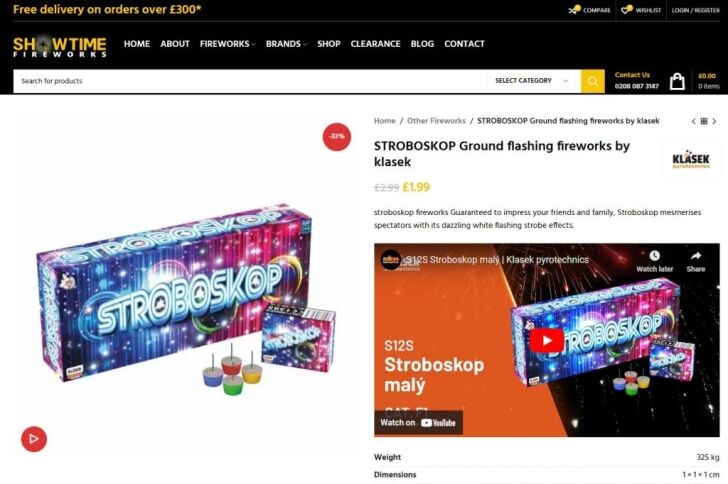
Your product pages are the heart of your WooCommerce website design. Well-optimised product pages not only attract search engines but also improve user experience and conversions.
Checklist for Optimising Product Pages:
- Product Titles: Include primary keywords and keep them descriptive (e.g., “Men’s Leather Wallet – Handmade in the UK”).
- Product Descriptions: Write unique, informative, and engaging descriptions that naturally include keywords.
- Images: Use high-quality images, compress them for faster loading, and add descriptive alt text.
- Internal Linking: Link to related products or categories to improve navigation and SEO.
Pro Tip: Avoid duplicate content by ensuring each product description is unique.
6. Create an XML Sitemap
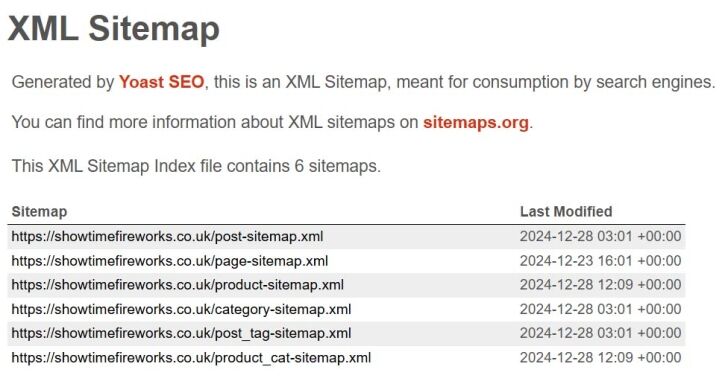
An XML sitemap helps search engines understand your website’s structure and index your pages effectively.
How to Create an XML Sitemap:
7. Implement Schema Markup
Schema markup provides search engines with additional information about your products, such as price, availability, and reviews. This can result in rich snippets, which enhance your search results.
How to Add Schema Markup:
- Use plugins like Rank Math or Schema Pro to automate schema implementation.
- Focus on Product Schema for individual product pages.
- Test your schema using Google’s Rich Results Test tool.
8. Optimise Site Speed
Page speed is a crucial ranking factor for SEO. A slow-loading site can frustrate users and harm your rankings.
Speed Optimisation Tips:
- Use a caching plugin like WP Rocket or W3 Total Cache.
- Optimise images using plugins like Smush or ShortPixel.
- Enable a Content Delivery Network (CDN) like Cloudflare to serve content faster.
- Minify CSS, JavaScript, and HTML files with tools like Autoptimize.
Pro Tip: Regularly test your site speed with tools like GTmetrix or PageSpeed Insights.
9. Secure Your Website
Website security is a priority for both users and search engines. A secure website builds trust and improves rankings.
Essential Security Measures:
- Install an SSL certificate to enable HTTPS.
- Use security plugins like Wordfence or Sucuri Security.
- Regularly update your WordPress core, plugins, and themes.
- Use strong passwords and limit login attempts.
Pro Tip: Monitor your site for vulnerabilities using a service like Sucuri SiteCheck.
10. Leverage Blog Content
A blog can drive organic traffic to your WooCommerce store by targeting informational keywords and establishing your brand as an authority in your niche.
Content Ideas:
- How-to guides related to your products.
- Industry trends and news.
- Product comparisons and reviews.
Pro Tip: Include internal links to product pages within your blog posts to drive traffic and improve SEO.
11. Build Quality Backlinks
Backlinks from reputable websites signal to search engines that your WooCommerce shop is trustworthy and authoritative.
How to Build Backlinks:
- Write guest posts for industry blogs.
- Reach out to influencers for product reviews.
- Create shareable content like infographics or videos.
Pro Tip: Avoid spammy backlinks, as these can result in penalties from search engines.
12. Optimise for Mobile Users
With mobile-first indexing, Google prioritises the mobile version of your site when determining rankings. A mobile-friendly WooCommerce store is essential.
Mobile Optimisation Tips:
- Use a responsive WooCommerce theme.
- Test your site’s mobile usability with Bing’s Mobile-Friendly Test.
- Simplify navigation and ensure buttons are easy to click on smaller screens.
Pro Tip: Enable Accelerated Mobile Pages (AMP) for faster loading on mobile devices.
13. Use Internal Linking Strategically
Internal links connect different pages of your website, helping search engines crawl your site and users navigate it more easily.
Internal Linking Tips:
- Link from product pages to related products or categories.
- Use keyword-rich anchor text.
- Regularly audit internal links to avoid broken links.
14. Reduce Bounce Rates
A high bounce rate can negatively impact your SEO rankings. By improving user experience, you can keep visitors on your site longer.
How to Reduce Bounce Rates:
- Optimise page speed and mobile usability.
- Ensure clear calls to action (CTAs).
- Write compelling meta descriptions that align with on-page content.
Pro Tip: Use tools like Hotjar to analyse user behaviour and identify areas for improvement.
15. Monitor Performance and Analytics
Regularly tracking your website’s performance helps you identify what’s working and where you need to improve.
Recommended Tools:
- Google Analytics: Monitor traffic, user behaviour, and conversions.
- Google Search Console: Track keyword rankings and fix indexing issues.
- Ahrefs or SEMrush: Analyse competitors and refine your SEO strategy.
Conclusion
SEO is an essential part of running a successful WooCommerce store, and the strategies outlined in this checklist will help you rank higher in search results and attract more customers in 2026. From optimising product pages to improving site speed and security, each step contributes to building a search engine-friendly store that delivers a superior shopping experience.
Stay consistent, track your progress, and adapt your strategies as SEO trends evolve. With the right approach, your WooCommerce store will become a leader in your niche, driving organic traffic and increasing revenue.



