

Artificial intelligence tools such as ChatGPT have changed how people work, learn, research and create content. Whether you are a business owner, marketer, student, developer or content creator, ChatGPT can help you complete tasks faster and more efficiently.
The quality of the answers you receive often depends on the quality of the prompts you provide. Learning how to communicate effectively with ChatGPT can dramatically improve the usefulness, accuracy and relevance of the responses.
This guide explores ten practical ChatGPT tips that will help you get better answers, save time and improve productivity.
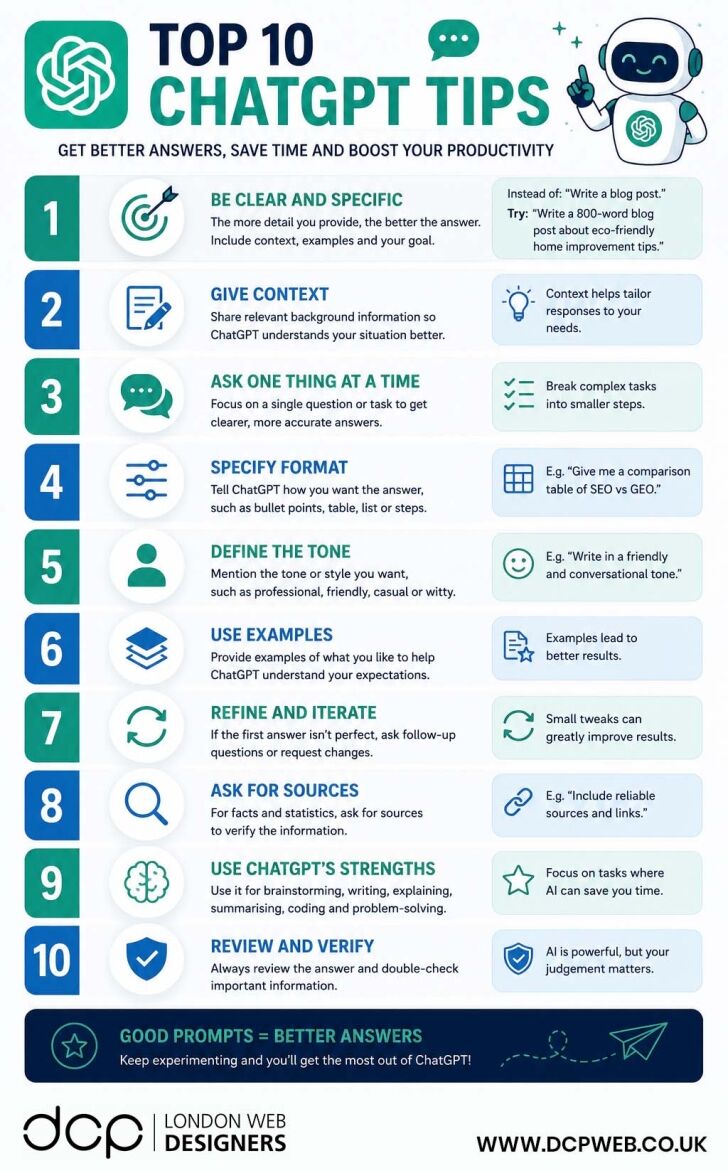
H2: 1. Be Clear and Specific
One of the most common mistakes users make is providing vague instructions.
The more specific your prompt, the better ChatGPT can understand what you need.
Instead of asking:
“Write a blog post.”
Try asking:
“Write an 800-word blog post about eco-friendly home improvement tips for UK homeowners.”
Providing details helps generate more focused and useful results.
H3: Include Key Information Such As:
- Topic
- Target audience
- Desired word count
- Purpose of the content
- Specific requirements
Clear prompts almost always produce better outcomes.
H2: 2. Give Context
Context helps ChatGPT understand your situation and tailor its response accordingly.
For example, rather than asking:
“How can I improve my website?”
You could say:
“I own a London-based web design company that specialises in WordPress website design. How can I improve my website’s lead generation performance?”
Additional information allows ChatGPT to provide more relevant suggestions.
H3: Useful Context Can Include:
- Business type
- Industry
- Goals
- Audience
- Existing challenges
- Budget considerations
H2: 3. Ask One Thing at a Time
Large and complex prompts can sometimes produce confusing answers.
Breaking tasks into smaller questions often delivers better results.
Instead of asking:
“Help me improve my website, SEO, social media, advertising and content marketing.”
Try addressing each topic separately.
H3: Benefits of Smaller Requests
- More focused answers
- Greater accuracy
- Easier follow-up questions
- Better quality recommendations
H2: 4. Specify the Format You Want
ChatGPT can present information in many formats.
If you know how you want the information displayed, include that instruction in your prompt.
Examples include:
- Bullet points
- Tables
- Numbered lists
- Step-by-step guides
- FAQs
- Blog articles
- Social media posts
H3: Example Prompt
“Create a comparison table showing the differences between SEO and Generative Engine Optimisation.”
This ensures the response is delivered in the format you need.
H2: 5. Define the Tone
The tone of content can significantly affect how it is received.
ChatGPT can adapt its writing style when given clear instructions.
Popular tone options include:
- Professional
- Friendly
- Conversational
- Educational
- Persuasive
- Technical
- Informal
H3: Example Prompt
“Write in a friendly and conversational tone suitable for small business owners.”
This helps create content that resonates with your audience.
H2: 6. Use Examples
Providing examples is one of the fastest ways to improve results.
Examples show ChatGPT exactly what you like and what you expect.
You can provide:
- Existing website content
- Blog articles
- Product descriptions
- Social media posts
- Email campaigns
H3: Why Examples Work
Examples reduce guesswork and help ChatGPT understand:
- Writing style
- Structure
- Formatting preferences
- Level of detail required
The more relevant the example, the better the output is likely to be.
H2: 7. Refine and Iterate
Your first answer does not have to be your final answer.
Many experienced ChatGPT users improve results through follow-up instructions.
For example:
- Make it shorter
- Add more detail
- Rewrite for beginners
- Include examples
- Create a table
- Optimise for SEO
H3: Treat AI as a Collaboration Tool
The best results often come from multiple rounds of refinement rather than a single prompt.
Small adjustments can significantly improve the final output.
H2: 8. Ask for Sources
When researching facts, statistics or industry information, it is useful to request sources.
This allows you to verify information before using it in reports, articles or business decisions.
H3: Example Prompt
“Provide reliable sources and references for the statistics included.”
Always verify important information independently, particularly when making business, legal or financial decisions.
H2: 9. Use ChatGPT for the Right Tasks
ChatGPT performs particularly well when helping with:
- Brainstorming ideas
- Content writing
- Summarising information
- Coding assistance
- Research support
- Marketing ideas
- Learning new topics
- Drafting emails and documents
H3: Save Time on Repetitive Work
Many users save hours every week by using ChatGPT to assist with routine tasks.
The key is identifying activities where AI can provide meaningful support without replacing human judgement.
H2: 10. Review and Verify Everything
Although ChatGPT is a powerful tool, it is not perfect.
You should always review important outputs before publishing, sending or implementing them.
H3: Double-Check:
- Facts and statistics
- Dates
- Pricing information
- Legal advice
- Medical information
- Financial guidance
- Technical instructions
Human review remains essential when accuracy matters.
H2: Why Better Prompts Lead to Better Results
Prompt writing is quickly becoming an important digital skill.
A well-written prompt provides:
- Clear instructions
- Relevant context
- Desired format
- Intended audience
- Specific goals
The more information ChatGPT receives, the more likely it is to generate useful responses.
Businesses that learn how to write effective prompts often achieve better outcomes when creating content, conducting research and solving problems.
H2: How Businesses Are Using ChatGPT Today
Many organisations are already using ChatGPT to improve productivity across different departments.
Common business uses include:
H3: Marketing
- Blog writing
- Content planning
- Social media ideas
- Email campaigns
H3: Customer Service
- FAQ creation
- Response templates
- Knowledge base content
H3: Website Development
- Content generation
- SEO recommendations
- Technical troubleshooting
- User experience improvements
H3: Business Operations
- Process documentation
- Meeting summaries
- Internal communications
- Training materials
H2: Final Thoughts
ChatGPT can be an incredibly valuable tool when used effectively. The difference between a poor answer and an excellent answer often comes down to the quality of the prompt.
By being specific, providing context, defining formats, using examples and refining responses, you can dramatically improve the usefulness of AI-generated content.
Whether you are writing blog posts, creating marketing campaigns, researching new topics or improving business processes, these ten ChatGPT tips will help you get more value from every conversation.
Remember, good prompts lead to better answers. The more clearly you communicate your goals, the better ChatGPT can help you achieve them.
What Is Ecommerce Conversion Optimisation?
Ecommerce conversion optimisation is the process of improving your website to encourage more visitors to complete desired actions such as:
- Purchasing a product
- Adding products to a basket
- Signing up for newsletters
- Requesting information
- Creating customer accounts
The goal is to increase the percentage of visitors who become customers without necessarily increasing advertising spend or website traffic.
Why Ecommerce Conversion Rates Matter
Increasing conversion rates offers several benefits:
- Higher revenue from existing traffic
- Better return on advertising investment
- Lower customer acquisition costs
- Improved customer experience
- Increased customer loyalty
- Better long-term business growth
Even small improvements in conversion rates can generate substantial increases in revenue over time.
1. Speed Up Your Website
Website speed plays a major role in ecommerce success. Modern shoppers expect pages to load almost instantly, especially when browsing on mobile devices.
Slow-loading websites often experience:
- Higher bounce rates
- Lower engagement
- Reduced sales
- Poor search engine rankings
Ways to Improve Website Speed
- Optimise image sizes
- Use WebP image formats
- Implement browser caching
- Use a Content Delivery Network (CDN)
- Choose high-performance hosting
- Minimise unnecessary plugins and scripts
Fast websites provide a smoother shopping experience and encourage customers to continue browsing.
2. Make Your Store Mobile-Friendly
Mobile commerce continues to grow each year. Many online shoppers browse, compare products and complete purchases directly from smartphones and tablets.
A mobile-friendly website should provide:
- Responsive layouts
- Easy navigation
- Fast loading speeds
- Large clickable buttons
- Simplified checkout forms
3. Use High-Quality Product Images
Customers cannot physically inspect products online, making product photography extremely important.
Professional product images help customers:
- Understand product features
- Visualise ownership
- Compare options
- Build confidence before purchasing
Best Practices for Product Photography
- Use high-resolution images
- Include multiple angles
- Show products in use
- Allow zoom functionality
- Maintain consistent image styles
Strong visuals often influence purchasing decisions more than product descriptions.
4. Write Clear and Persuasive Product Descriptions
Product descriptions should do more than simply list specifications.
Effective descriptions explain:
- Key features
- Customer benefits
- Common use cases
- Problem-solving capabilities
- Unique selling points
What Makes a Good Product Description?
- Easy-to-read formatting
- Bullet point summaries
- Customer-focused language
- Clear calls to action
- Search engine optimisation
5. Display Customer Reviews and Testimonials
Social proof is one of the most powerful conversion tools available.
Positive reviews demonstrate that other customers have successfully purchased and enjoyed your products.
Benefits include:
- Increased trust
- Reduced purchase hesitation
- Improved credibility
- Higher conversion rates
Displaying verified reviews directly on product pages can significantly improve sales performance.
6. Use Trust Badges and Security Signals
Online shoppers need reassurance that their information is secure.
Trust indicators help remove doubts and improve confidence during checkout.
Common Trust Signals
- SSL certificates
- Secure payment icons
- Money-back guarantees
- Customer review ratings
- Industry accreditations
- Secure checkout badges
Trust-building elements are particularly important for new ecommerce brands.
7. Simplify the Checkout Process
Complicated checkout experiences are one of the biggest causes of abandoned baskets.
Customers should be able to complete purchases quickly and easily.
Checkout Optimisation Tips
- Reduce form fields
- Enable guest checkout
- Offer address autofill
- Display progress indicators
- Minimise distractions
The fewer barriers customers encounter, the more likely they are to complete their purchase.
8. Offer Multiple Payment Options
Different customers have different payment preferences.
Providing multiple payment methods increases convenience and reduces abandoned purchases.
Popular Ecommerce Payment Options
- Credit cards
- Debit cards
- PayPal
- Apple Pay
- Google Pay
- Klarna
- Clearpay
- Bank transfer options
Flexible payment choices help accommodate a wider range of shoppers.
9. Be Transparent About Shipping Costs
Unexpected shipping costs remain one of the most common reasons for cart abandonment.
Customers prefer transparency throughout the buying process.
Shipping Information to Display Clearly
- Delivery costs
- Estimated delivery times
- Free shipping thresholds
- International shipping options
- Tracking availability
Clear shipping information reduces surprises and improves trust.
10. Make Returns Easy
A straightforward returns policy helps customers feel more comfortable making purchases.
When shoppers know they can easily return products if necessary, they are often more willing to buy.
Return Policy Best Practices
- Clearly explain return procedures
- Outline timeframes
- Highlight refund options
- Simplify return requests
- Make policy information easy to find
Easy returns reduce perceived risk and support customer satisfaction.
11. Use Pop-Ups Strategically
Pop-ups can be highly effective when used correctly.
Rather than interrupting visitors, they should provide genuine value.
Examples include:
- First-order discounts
- Newsletter sign-ups
- Abandoned cart reminders
- Limited-time promotions
- Product recommendations
Carefully timed pop-ups can increase conversions without negatively affecting user experience.
12. Analyse and Continuously Improve
Successful ecommerce businesses constantly test and refine their websites.
Customer behaviour evolves, making ongoing optimisation essential.
Metrics to Monitor
- Conversion rates
- Cart abandonment rates
- Average order value
- Bounce rates
- Customer lifetime value
- Revenue per visitor
Tools such as Google Analytics, heatmaps and user session recordings can provide valuable insights into customer behaviour.
Bonus Ecommerce Conversion Tips
Beyond the core strategies above, consider implementing additional techniques to increase sales further.
Email Marketing
Email marketing remains one of the highest-performing ecommerce channels.
Use email campaigns to:
- Promote offers
- Recover abandoned carts
- Launch new products
- Encourage repeat purchases
Personalise the Shopping Experience
Personalisation helps customers discover products that match their interests.
Examples include:
- Recommended products
- Recently viewed items
- Personalised offers
- Dynamic content
Create Urgency
Urgency can encourage customers to act sooner.
Examples include:
- Limited-time promotions
- Low stock notifications
- Seasonal offers
- Flash sales
Deliver Excellent Customer Support
Responsive customer service helps answer questions and remove purchase barriers.
Support options may include:
- Live chat
- Email support
- Telephone support
- Knowledge bases
- Frequently asked questions
Focus on Customer Experience
The best ecommerce websites prioritise customer satisfaction throughout every stage of the journey.
Satisfied customers are more likely to:
- Return for future purchases
- Leave positive reviews
- Recommend your business
- Become long-term brand advocates
Common Ecommerce Conversion Mistakes to Avoid
Many online stores struggle with conversions because of avoidable issues such as:
- Slow website performance
- Poor mobile usability
- Weak product descriptions
- Limited payment options
- Hidden costs
- Complicated navigation
- Difficult checkout processes
- Lack of trust signals
Identifying and resolving these issues can often lead to immediate improvements.
Ecommerce Conversion Tips Summary
Increasing ecommerce conversions does not always require major website redesigns. Often, a series of small improvements can significantly impact sales and customer satisfaction.
By focusing on website speed, mobile usability, product content, trust signals, streamlined checkout experiences and ongoing optimisation, online retailers can create a shopping experience that encourages more visitors to become customers.
The most successful ecommerce businesses continually test, analyse and refine their stores to meet changing customer expectations and maximise long-term growth.
DCP Web Designers is a web agency with over 20 years of experience and 300+ five-star Google reviews.



