

Tuesday afternoon hits hard. Frontend developers are pushing a major checkout redesign to staging. Launch day drops on Friday. Tension runs high across the product team.
Staging environments reveal a glaring visual issue almost immediately. Empty cart states, payment processing screens, and success modals feature random graphics stitched together from disparate free libraries.
Stroke weights clash instantly. Colour palettes completely conflict. One illustration features thick rounded lines, while the next displays sharp isometric angles. Outgrowing piecemeal assets mid-launch happens fast for growing companies.
Startups need visual scaling immediately. Failing here makes your product look like a cheap, poorly assembled template. Users notice mismatched design systems right away, dropping trust and abandoning carts.
Hitting this exact bottleneck breaks scattered vector sites as a viable strategy. Enter Ouch. Icons8 created a professional illustration library specifically for scaling problems. Thousands of professional vectors sit ready for immediate action. Designers get consistent UX coverage across an entire product flow natively.
Unifying the Checkout Experience
Replacing disjointed visual systems requires finding a single cohesive aesthetic. You can’t just skip a state and maintain quality. Cart pages, login prompts, credit card errors, and final confirmation screens all demand custom treatment. Missing just one state breaks the illusion of a premium product.
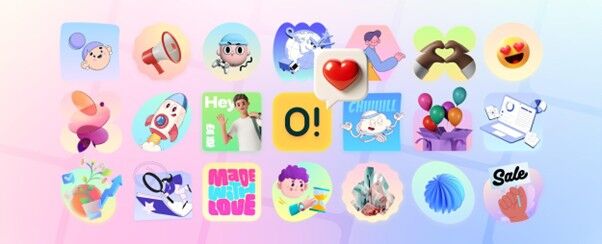
Ouch tackles problem-solving by grouping assets into 101 distinct styles. UI designers select specific aesthetics like minimal monochrome or rough sketchy looks. Pulling every necessary state from that exact family takes literally minutes. Need a severed connection icon matching your cart illustrations? Search the style library and grab it directly.
Bypassing the browser entirely speeds up production remarkably. Dragging and dropping assets straight into Figma happens through the Pichon desktop app effortlessly. Pichon includes all illustrations and transparent PNG photos within a tiny floating window.
Grab a shopping bag graphic for add-to-cart states. Drop a declined card visual onto 404 error pages. Place a celebratory confetti scene inside the payment success modal. Flawless visual continuity emerges because the same artists built everything together. Checkout flows transform from mismatched patchworks to brand-ready interfaces before dinner.
Aligning the Post-Purchase Sequence
Core app UI gets locked down eventually. Marketing teams then take over building automated post-purchase email sequences. Startups often fail miserably right here. Pristine app interfaces clash horribly with follow-up emails featuring off-brand graphics. Customers receive a beautiful receipt in-app, followed by a clunky newsletter showing completely unrelated character designs.
Content managers bridge that gap using Mega Creator. Icons8 provides a highly functional online editor natively. Users locate the exact same illustration style from the checkout flow rapidly. Break down layered vector graphics into tagged, searchable objects instead of settling for static pre-made scenes.
Shipping confirmation emails need specific custom imagery. Finding a standard delivery truck graphic takes merely seconds. Swap out background trees for urban buildings easily. Rearrange cardboard packages and recolour brand accents to match company identity perfectly. Add a tiny logo onto the driver’s hat for extra polish.
Replacing outdated clipart with highly customisable vectors works absolute wonders. Email campaigns suddenly mirror in-app experiences exactly. Export that final customised graphic directly to your marketing automation platform without leaving the browser.
Evaluating the Alternatives
Navigating vector libraries requires understanding platform strengths deeply. Choosing the wrong asset pool burns countless hours during crunch time.
Many startups start with unDraw organically. Quick, customisable SVG graphics look perfectly clean initially. Saturation ruins the magic, unfortunately. Ubiquitous unDraw assets immediately signal a low-budget project to savvy internet users. Seeing the same purple characters across fifty different SaaS landing pages destroys unique brand identity. Variety matters heavily for differentiation. Ouch packs over 28,000 business illustrations and 23,000 technology pieces. Styles range from abstract surrealism to simple elegant line art.
Freepik operates as a massive decentralised search engine. High volume sounds fantastic initially. Tight curation isn’t a priority there at all. Finding five images that actually belong in the same app burns hours of manual filtering. One artist’s flat vector rarely matches another artist’s gradient style. Strict style guidelines group assets inside Ouch natively. Building a coherent system happens much faster when artists share exact grid systems.
Custom drawing solves cohesion problems beautifully. Timelines and budgets fail entirely, though. Bespoke artwork won’t fit a quick launch schedule. Hiring in-house illustrators or freelance professionals takes weeks just to sketch thirty custom checkout states. Revisions push launch dates back even further. Middle grounds exist thankfully. Grab the cohesion of a custom project on the rapid timeline of a stock library.
Boundaries and Production Constraints
Powerful systems impose specific technical constraints always. Teams must navigate these roadblocks carefully before committing fully.
Free tiers carry extremely heavy restrictions. Users only get low-resolution PNG formats initially. Every single use requires an active attribution link back to Icons8. Placing required links under e-commerce checkout illustrations kills consumer trust instantly. Shoppers see external links near credit card fields and abandon purchases immediately. Scaling real products demands upgrading to paid Pro plans. Doing so removes attribution requirements entirely and unlocks scalable SVG files.
Animation and 3D offerings require serious technical expertise. Formats include Lottie JSON, Rive, After Effects projects, and animated GIFs. Editing them means opening After Effects directly or diving into Rive timeline tools. Changing a character’s shirt colour in a Lottie file demands motion design skills.
Forty-four styles of 3D models arrive in raw FBX format. Professional 3D artists craft these beautifully. Dedicated software knowledge remains absolutely necessary, though. Opening an FBX requires Blender, Cinema4D, or Spline capabilities. Lacking animators or 3D proficient staff leaves those specific sections completely inaccessible. Know your team’s software limitations before planning a fully 3D interface.
Field Notes for Implementation
Getting maximum value from these libraries requires a few tactical workflow adjustments.
- Search by components: Limit searches to full scenes at your own peril. Objects come broken down and tagged individually inside the database. Searching for a specific desk, potted plant, or mobile device yields standalone components. Combine them instantly to build custom scenes matching your exact narrative.
- Manage unused credits: Paid plans feature monthly rollover downloads. Initial launch states might require heavy asset generation right away. Next month might need absolutely zero new vectors. Let unused downloads roll over naturally into your account. Build a solid asset reserve for future major feature launches.
- Test Lottie compatibility: Committing to an animated style for a mobile app carries significant risk. Test single Lottie JSON files in your staging environment first. Ensure smooth playback on your specific tech stack before downloading fifty animated icons.
- Use free badges: Testing styles before securing budget approval makes total sense. Apply specific interface filters to isolate assets marked explicitly with “Free” badges. Designers can build complete checkout mockups in PNG format rapidly. Present the polished flow to stakeholders before requesting Pro upgrades for final production SVG exports.



