

Testing internet speed shouldn’t be a daunting task. Various online tools make it straightforward.
Some popular ones include Speedtest.net, SpeedGeo.net, Fast.com, and others. They offer insights into download and upload speeds, latency, and more. Most of the time, they are also global – they work regardless of whether you are testing German, Australian, or UK internet speed.
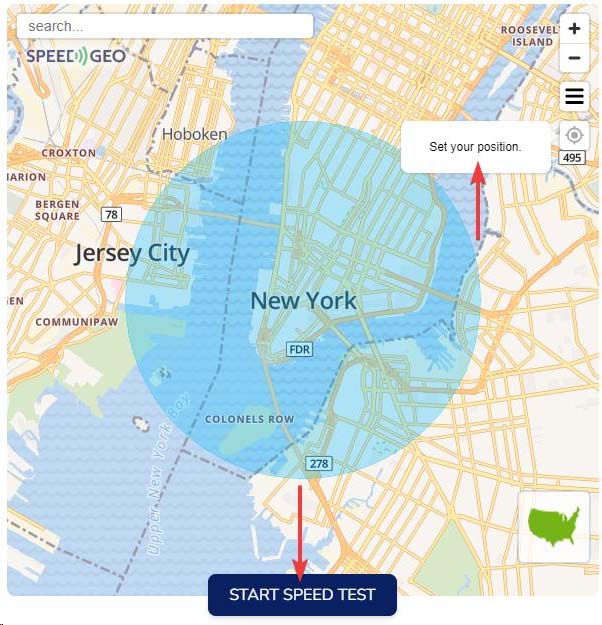
Simply visit these sites and hit the test button. Within seconds, you get detailed results. It will help you gauge if your current speed meets your remote work demands.
Interpreting Your Results
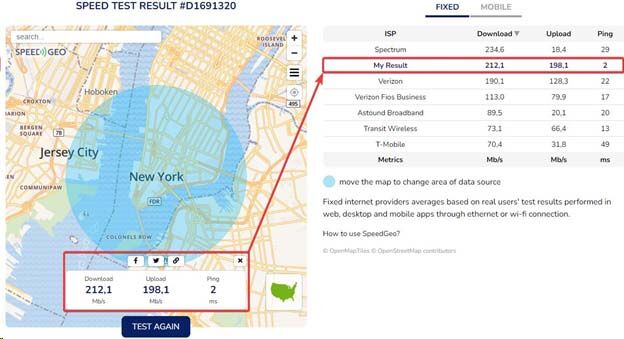
Getting data is one thing; understanding it is another.
Download speed measures how fast data travels from the internet to your device. This impacts tasks like streaming videos or loading web pages.
Upload speed indicates how quickly you can send data to the internet. It’s crucial for video calls and sending large files.
Latency or ping measures delay in data transfer, affecting real-time communications like VoIP calls.
Consistent Testing for Accuracy
Testing once gives a snapshot; testing regularly offers a clearer picture.
Factors like network traffic or time of day influence speed. Regular tests help track performance over time, identifying any patterns or issues.
Pick different times of the day for testing: morning, afternoon, and evening. This way, you can get comprehensive insights into your internet’s reliability.
Enhancing Your Internet Performance
If you’re experiencing slow speeds or frequent disconnections, there are several steps you can take to enhance your internet performance.
Upgrade Your Plan
Sometimes, slow speeds are due to outdated plans. ISPs (Internet Service Providers) regularly upgrade their offerings. So, check if there’s a better plan available that suits remote work needs better.
If you’re using an entry-level package, consider mid-tier or premium options. While they may cost more, they provide faster speeds and better stability, a worthy investment for working efficiently from home.
Improve Wi-Fi Signal
Poor Wi-Fi signal leads to slow speeds, even with good plans.
Placement of the router is crucial, central locations reduce dead zones. Walls and electronic devices can interfere with signals, so keep routers in open spaces free from obstructions.
Using devices like range extenders or mesh networks can also boost coverage in larger homes or areas with bad reception spots.
Esim Services
Using an eSIM for remote work offers flexibility, seamless connectivity, and easy switching between networks without physical SIM swaps. It ensures reliable internet access worldwide, enhancing productivity. Holafly’s eSIM provides unlimited data plans in over 190 countries, making it ideal for remote workers needing constant, hassle-free connectivity abroad.
Weigh Your Options: Wired vs. Wireless Connections
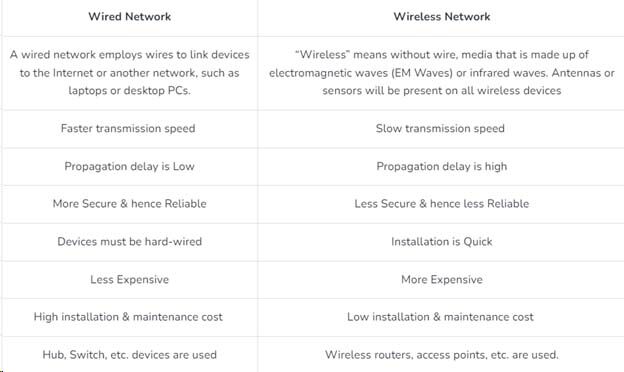
Wi-Fi offers convenience but can be inconsistent, especially in homes or buildings with thick walls or interference issues.
On the other hand, Ethernet (wired) connections typically deliver the maximum speeds provided by your ISP without the disturbances that can affect wireless setups.
Connecting via Ethernet ensures a stable and reliable internet connection, which is crucial for critical or sensitive tasks requiring flawless execution.
By using a wired connection, you can avoid unexpected buffering or sudden glitches that can disrupt your workflow.
Conclusion
A stable internet connection is key to smooth communication, easy data transfers, and a better remote work experience.
To make sure your internet keeps up with your work demands, regularly test your speed using online tools and get familiar with what the results mean for your specific job needs.
If you find your speeds lagging, think about upgrading your plan, boosting your Wi-Fi signal, or switching to a wired connection.
Each of these actions can significantly improve your internet performance, helping you tackle the challenges of remote work more effectively.
Frequently Asked Questions
How does internet speed affect remote work collaboration tools?
Web-based collaboration tools like Slack, Microsoft Teams, and Zoom require fast internet speeds for smooth operation.
A robust and dependable internet connection ensures seamless communication, efficient decision-making, and alignment with shared goals.
How to improve video call quality?
To improve video call quality, minimize background bandwidth usage by closing unnecessary applications and bandwidth-heavy services. This can dramatically increase the reliability of your calls, resulting in a more professional output and fewer errors.
Can VPNs impact my internet speed?
Yes, VPNs can impact your internet speed. The effect depends on various factors, including the VPN provider, server locations, and encryption overhead.
While VPNs enhance security, they can sometimes slow down your connection.
Consult your workplace’s specific policies to find a balance between maintaining cybersecurity and ensuring necessary internet speed.
How often should I restart my router to maintain optimal performance?
It’s generally recommended to restart your router at least once a month. However, if you experience frequent connectivity issues, restarting it more often could be beneficial.
Restarting your router clears its cache and refreshes your internet connection.
What should I do if my internet speed suddenly drops?
First, try restarting your modem and router. Check if other devices on your network are consuming excessive bandwidth.
If the problem persists, contact your ISP to ensure there are no outages or issues on their end.
Running regular speed tests at different times can also help you identify patterns or specific causes of slowdowns.



