

When your iPhone fills up with duplicate photos, blurry images, and unnecessary screenshots, it results not only in wasted space, but backups taking longer, and your photo library becomes harder to manage. The first instinct might be to buy more iCloud storage or start deleting files at random, but there’s a smarter way.
iOS already includes built-in tools to detect and remove duplicates, and when paired with the best app to delete duplicate photos on iPhone, you can quickly clear out clutter, delete poor-quality shots, and keep only the best versions of your photos.
In this guide, you will find step-by-step methods that help clean your library and free up space without the risk of losing important images.
Why Duplicate and Blurry Photos Become a Real Issue
Anyone who uses an iPhone for daily photos eventually faces the same problem – the gallery fills with files that are not worth keeping. These fall into three main groups:
- Simple duplicates – copies appear when a user saves the same image from apps or the cloud.
- Similar shots – burst mode, Live Photos, or repeated clicks produce multiple nearly identical pictures.
- Low-quality or blurry photos – photos in poor light, with focus errors, or during quick movement lose sharpness.
At first glance, each extra photo seems minor. Yet together they occupy gigabytes, slow down iCloud backups, and make the gallery harder to manage.
The built-in Photos app helps only partly: it detects exact duplicates but fails to filter similar or blurry shots. For deeper clean-up, users need third-party solutions. This is where tools designed as the best app to delete duplicate photos on iPhone that remove low-quality files become useful.
2 Methods to Clear Duplicate and Blurry Photos
In the next part of this guide, we’ll cover two practical methods that solve most photo clean-up problems on iPhone. First, you’ll see how to use Apple’s built-in Photos app to quickly detect and remove exact duplicates.
Then, we’ll walk through a trusted third-party cleaner that goes further, helping you deal with similar shots, blurry images, and other clutter the default tools miss.
Method 1: Use the Photos App to Remove Duplicates
The first method is the simplest way to free space on your iPhone. Apple added a duplicate detection tool in iOS 16 that works as a built-in iPhone photo cleaner. It automatically creates a Duplicates album and lets you merge or delete copies without any cost. For anyone who wants to remove duplicate photos on their iPhone for free, this is the most direct option.
How to remove duplicate photos on iPhone with the Photos app:
- Open the Photos app.
- Scroll down and tap Duplicates under Utilities.
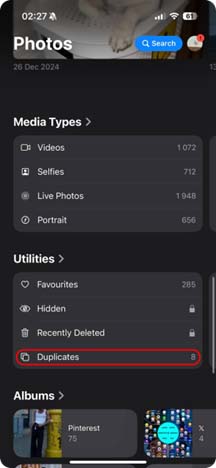
- Open the Photos app.
- Scroll down and tap Duplicates under Utilities.
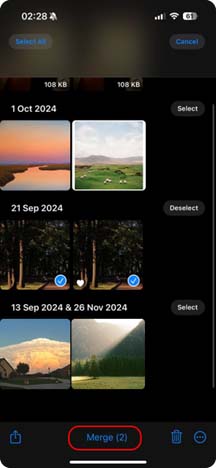
- Tap Merge [X] Copies.
- Confirm to keep one photo and move the rest to Recently Deleted.
The “Duplicates” feature in Photos works well for quick cleanup and helps remove exact copies without extra apps. It saves space instantly, but its scope is limited – it usually ignores similar or blurry photos. For deeper cleanup, many users turn to third-party tools from the App Store.
Method 2: Use Clever Cleaner to Remove Duplicates and Blurry Photos
Not every duplicate photo looks the same, and that is where the default Photos app falls short. It detects exact matches, but leaves behind near-identical shots and blurry images.
For this reason, many users turn to an app to delete duplicate photos on iPhone for a deeper clean-up. Among these options, the Clever Cleaner app for iPhone stands out.
Clever Cleaner works as a complete iPhone photo cleaner. With one tap, it scans the library, detects duplicates, and selects the best version of each photo. It also finds blurry shots, large files, screenshots, and even compresses Live Photos to save space.
Unlike many other tools, it clears clutter without ads, subscriptions, or hidden fees. This makes it a strong choice for anyone who needs the best photo cleaner app for iPhone for free.
How to clean up photos with Clever Cleaner:
- Open the App Store and download Clever Cleaner.
- Launch the app and grant access to your photo library.
- Tap Similars to review grouped duplicates and blurry shots.
- Click Smart Cleanup.
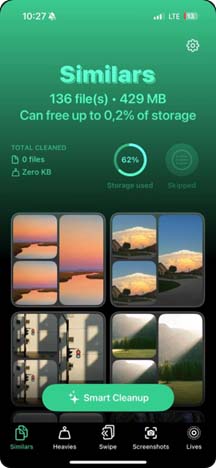
- Then choose the photo and tap Slide to Delete
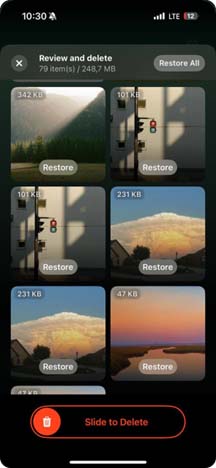
With Clever Cleaner, iPhone users can quickly spot duplicates and unnecessary shots. It goes further than the standard Photos app, making storage management faster and easier.
Don’t Want to Delete Blurry Photos? Try Fixing Them
Blurry photos are tricky. They do take up storage, but sometimes they hold personal value, and you may not want to delete them. In those cases, it’s worth trying a quick touch-up. With a bit of sharpening, a photo that looked unusable might earn its place back in your gallery.
How to fix blurry photos on iPhone:
- Open the Photos app and select the picture.
- Tap Edit in the top right corner.
- Choose the Adjust icon (the dial with sliders).
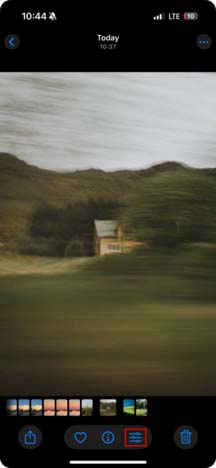
- Scroll to Sharpness and move the slider until the photo looks clearer.
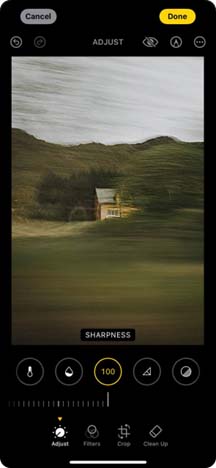
This option works well for a few images that matter – for example, rare family shots or unique moments. But if your library has hundreds of blurry photos, manual edits take too much time.
In that case, a clean-up app such as Clever Cleaner proves more effective, since it highlights large groups of low-quality images and helps free storage in one pass.
FAQ
Does iPhone have a built-in way to remove duplicate photos?
You can manually scan albums and trash photos, but it takes time and increases the risk of deletion of good images by mistake. Most users prefer apps to delete duplicate photos iPhone offers because they save time and reduce errors.
Can I delete all duplicates manually?
You can manually scan albums and trash photos, but it takes time and increases the risk of deletion of good images by mistake. Most users prefer apps to delete duplicate photos iPhone offers because they save time and reduce errors.
What is the best app to delete duplicate photos on iPhone?
Among several tools, many reviews highlight that Clever Cleaner stands out as the best app to delete duplicate photos on iPhone, thanks to its range of abilities. It finds exact duplicates, groups near-identical shots, detects blurry or low-quality photos, removes unnecessary screenshots, compresses Live Photos to save space, and automatically keeps the best version of each image.
Which is the best photo clean up app for iPhone free of charge?
Clever Cleaner also ranks as one of the best apps to clean up photos on iPhone, with duplicate detection, screenshot removal, and Live Photo compression at no cost.
Do other users recommend cleanup apps?
Yes. On Reddit, many iPhone owners say that the built-in Duplicates feature misses similar shots, and they rely on third-party tools to clear their libraries effectively.
Final Thoughts
Apple’s built-in Duplicates tool helps remove obvious copies, but it often skips near-identical or blurry shots. For iPhone owners who want more control, a trusted app that removes duplicate photos offers a faster and more accurate cleanup.
Among the available tools, Clever Cleaner stands out as the best app to delete duplicate photos on iPhone, since it checks for duplicates, similar shots, and heavy files in one scan. It keeps the best version of each photo and frees up storage without ads or hidden fees.
Discussions on Reddit show that many users prefer third-party apps over Apple’s feature because they get better results.
In the end, the right photo cleaner helps save time, maintain order in your library, and keep your iPhone ready for new photos.



