

WordPress is one of the most popular content management systems (CMS) due to its flexibility, user-friendly interface, and expansive plugin ecosystem. However, one of the most crucial aspects of managing a WordPress website is keeping it up to date.
Whether it’s the core WordPress installation, themes, or plugins, regular updates are essential to ensure your website remains secure and performs at its best.

In this guide, we will walk you through how to enable auto-updates in WordPress, ensuring that your site is always running the latest versions of everything it depends on without manual intervention.
Why Enable Auto Updates?
Before we get into the how, it’s important to understand why enabling auto-updates is beneficial. Here are a few key reasons:
- Improved Security: Regular updates patch vulnerabilities that can be exploited by hackers. Auto-updating ensures that you receive the latest security fixes as soon as they are released.
- Bug Fixes: Updates often include fixes for bugs that might affect your website’s functionality. Auto-updating ensures these issues are addressed promptly.
- New Features: Updates can also introduce new features that improve the performance or usability of your site.
- Saving Time: Auto-updates remove the need for manual intervention, saving you time and allowing you to focus on your content and other website management tasks.
Step-by-Step Guide to Enabling Auto Updates in WordPress
There are several ways to enable auto-updates on WordPress, from simple dashboard settings to code-based solutions. Let’s explore the easiest and most effective methods.
1. Enable Auto Updates for Plugins and Themes from the WordPress Dashboard
WordPress 5.5 introduced a built-in feature for enabling automatic updates for plugins and themes, making it simple for users to turn on auto-updates from their dashboard.
Enabling Auto Updates for Plugins:
- Step 1: Log in to your WordPress dashboard.
- Step 2: Navigate to Plugins > Installed Plugins.
- Step 3: You will see a list of all the plugins installed on your site. Next to each plugin, there’s an option labelled “Enable Auto-updates.”
- Step 4: Click on “Enable Auto-updates” for any plugin that you want to update automatically.
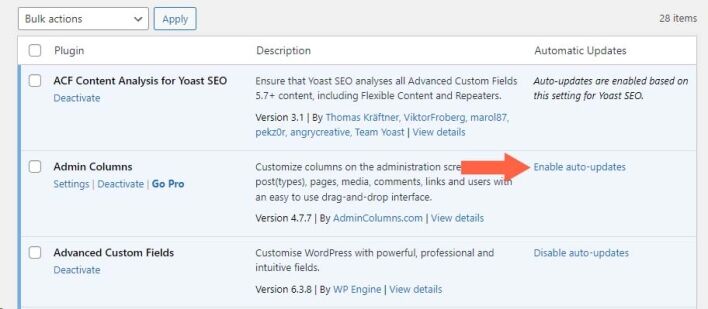
That’s it! WordPress will now automatically update the selected plugins whenever a new version is released.
Enabling Auto Updates for Themes:
- Step 1: In your WordPress dashboard, go to Appearance > Themes.
- Step 2: You will see a list of your installed themes. Click on the theme you want to enable auto-updates for.
- Step 3: On the theme details page, look for the Enable Auto-updates button and click on it.
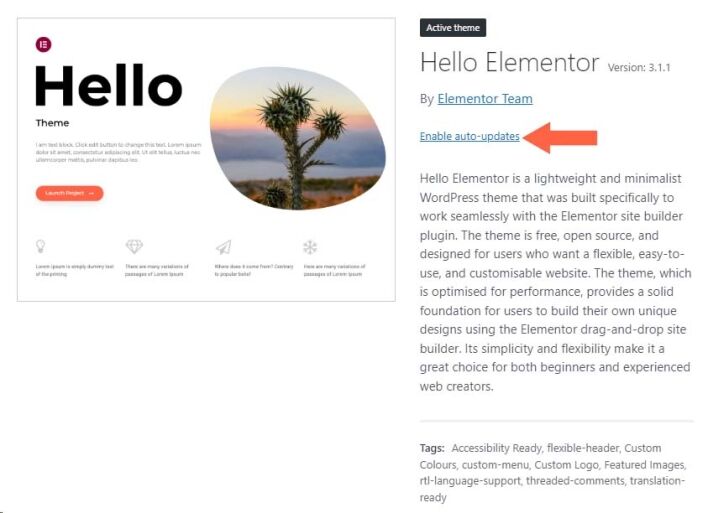
Once enabled, the selected theme will automatically update to the latest version whenever a new release is available.
2. Enable Auto Updates for WordPress Core
While plugins and themes are important, keeping your WordPress core updated is critical to maintaining security and performance. By default, WordPress automatically installs minor updates (e.g., 6.0.1 to 6.0.2), but major updates need to be enabled manually.
Method 1: Using the wp-config.php File
You can enable automatic updates for all WordPress core versions by modifying your wp-config.php file.
- Step 1: Connect to your site using an FTP client or your hosting provider’s file manager.
- Step 2: Open the
wp-config.phpfile located in the root directory of your WordPress installation. - Step 3: Add the following line of code just above the line that says “That’s all, stop editing! Happy publishing.”:
define( ‘WP_AUTO_UPDATE_CORE’, true );
- Step 4: Save and upload the
wp-config.phpfile back to your server.
Now, your WordPress core will automatically update for both minor and major releases.
Method 2: Using a Plugin
If you’re uncomfortable editing files directly, you can use a plugin to manage auto-updates. A great option is the Easy Updates Manager plugin.
- Step 1: Install and activate the Easy Updates Manager plugin from the WordPress plugin repository.
- Step 2: Once activated, go to Dashboard > Updates Options.
- Step 3: Here, you can enable auto-updates for WordPress core, plugins, themes, and even translation files. This plugin offers a user-friendly interface to control all your update settings in one place.
3. Configuring Auto Updates for Specific Plugins or Themes
Sometimes, you may not want every plugin or theme to update automatically, especially if it’s critical to your website’s functionality or heavily customised.
Fortunately, WordPress allows for fine-tuned control over this.
Each plugin that you install has a separate option to enable or disable auto-updates, the same applies to any theme you install.
Fully Managed WordPress
Here’s a list of hosting providers that offer fully managed WordPress hosting, including management of WordPress core, plugins, and themes:
1. WP Engine
- Key Features: Automatic WordPress updates, daily backups, automatic plugin updates, managed security.
- Plugin and Theme Management: Offers automatic updates for WordPress core, plugins, and themes via its user dashboard.
2. Kinsta
- Key Features: Automatic daily backups, WordPress core updates, and support for plugin management.
- Plugin and Theme Management: Provides automatic WordPress core updates and supports plugin updates, but users are encouraged to monitor major updates for compatibility.
3. SiteGround
- Key Features: Managed WordPress hosting, daily backups, automatic WordPress core updates, and advanced security.
- Plugin and Theme Management: Offers auto-updates for WordPress core and plugins, and provides a staging environment for testing theme and plugin updates before pushing them live.
4. Bluehost
- Key Features: Daily backups, automatic WordPress core updates, and a staging environment.
- Plugin and Theme Management: Manages automatic updates for WordPress core, plugins, and themes. Users can set auto-updates for all plugins and themes from the dashboard.
5. Flywheel
- Key Features: Automatic WordPress core updates, daily backups, and caching management.
- Plugin and Theme Management: Flywheel offers automatic WordPress core updates and plugin updates, helping users keep their site secure and up to date without manual intervention.
6. Liquid Web
- Key Features: Automatic daily backups, WordPress core updates, and advanced security.
- Plugin and Theme Management: Provides automatic updates for WordPress core, plugins, and themes through iThemes Sync Pro, included in the hosting package.
7. Pressable
- Key Features: Daily backups, automatic WordPress core updates, and malware scanning.
- Plugin and Theme Management: Pressable offers full management of WordPress core, plugins, and theme updates, ensuring your site is always up to date.
8. DreamHost
- Key Features: Daily backups, automatic WordPress core updates, and server-level caching.
- Plugin and Theme Management: Automatic WordPress core updates are enabled, and the dashboard allows users to enable plugin and theme auto-updates.
9. Pagely
- Key Features: Automatic backups, WordPress core updates, and advanced security measures.
- Plugin and Theme Management: Offers managed WordPress core updates and supports automatic plugin updates, focusing on security and stability.
10. Cloudways
- Key Features: Automatic backups, cloud-based hosting, managed security.
- Plugin and Theme Management: While Cloudways does not natively offer plugin auto-updates, they provide one-click updates for WordPress core and plugins via the admin panel, with support for auto-updates through WordPress settings or third-party plugins like Easy Updates Manager.
These hosting providers focus on offering fully managed WordPress hosting solutions, ensuring your WordPress core, plugins, and themes are always up to date, while also providing strong security measures and backup solutions.
Conclusion
Enabling auto-updates on WordPress ensures that your website is always up-to-date, secure, and running smoothly without requiring constant manual intervention. Whether you’re managing a small personal blog or a large-scale business website, keeping everything updated is essential for both security and performance.
By following the steps outlined in this guide, you can easily set up automatic updates for WordPress core, themes, and plugins, giving you peace of mind that your site is well-maintained while saving you time in the process



