

Starting your website directory can be daunting, but with the right tools and guidance, it can be an easy and fun process that bears fruit for years to come.
Curious about how to start one for yourself? You’ve come to the right place.
In this guide, we will show you exactly how to create a money-making directory website on WordPress using three simple WordPress plugins (GeoDirectory, GetPaid, and UsersWP).
Ready? Let’s get started!

What is a directory website?
A directory website is an online database platform that allows businesses to list themselves, their services, or products on it to be found by searchers.
It’s a great way for companies to get more exposure and reach new customers, and it’s also a fantastic way for webmasters to make some passive income.
How to pick the niche for your directory website
Why go narrow with a niche and not broad to ‘offer more value’?
If you try to be all things to all people, chances are you’ll end up not being anything to anyone. There’s just too much work and competition in that scenario when starting off.
It’s better to focus on a specific niche so you can be the go-to source for that particular market. Here are some examples:
- Events
- Real Estate
- Classifieds
- Jobs
- Restaurants
- Hotels
The best way to find a directory website niche is to look for a problem that needs solving in your specific market, and then build a directory website around that. Here are some tips on how to pick a niche for your directory website:
Think about what you’re into – it’s important to think about the types of products, industries, and services you’d like to be involved with. Starting with this thought will make you more passionate about your project so it’ll become easier to see it through.
- Like to eat out with friends? You might have a good idea of the most popular restaurants in your town/city, the type of food they serve, and what their best dishes are – so you may want to specialise in local diners!
- Love dogs? A platform for people to find the best dog-walking services in their area.
- Are you a vegan? A database of the best plant-based or vegan restaurants around the world.
- Love children? A go-to source for finding babysitters in a city.
- Get more specific with keyword research – Once you’ve established your niche, you’ll want to do some long-tail keyword research that lets you dive deeper into what users are looking for. Get started with free keyword research tools like KWFinder or Ubersuggest.
- So, for example, searching for “Repairmen near me” may also show you “garage repair in my area”, “fence repair near me”, “appliance repair near me”, and “Holiday repairmen near me”. These are all relevant – but the low competition – keywords you’ll want your directory site to rank for to generate relevant traffic and business.
- Check out the competition – Before you move forward with your project, you’ll want to take a look at what other directory websites are out there and what they’re doing well (or not so well). Check out their design, user experience, and how easy it is to navigate their website. This will give you a good idea of what to do (and not to do) with your own website. If you notice there’s too much competition in your area, you may want to consider broadening your niche or target market.
How to set up your directory website on WordPress
Now that you know how to pick the perfect niche for your directory website, it’s time to set it up on WordPress.
While you can set up your directory site fast and cheap on WordPress.com, if you want an advanced directory site that can support thousands of visitors, your best bet is WordPress.org, which is the more robust, self-hosted version of WordPress.
1. Pick a reliable website host
Going with WordPress.org means you’ll probably need a web host for peace of mind. You can use Cloudways.com and sign up for a free trial account through email or social media.
After verifying your account through email confirmation, you can begin the easy setup process.
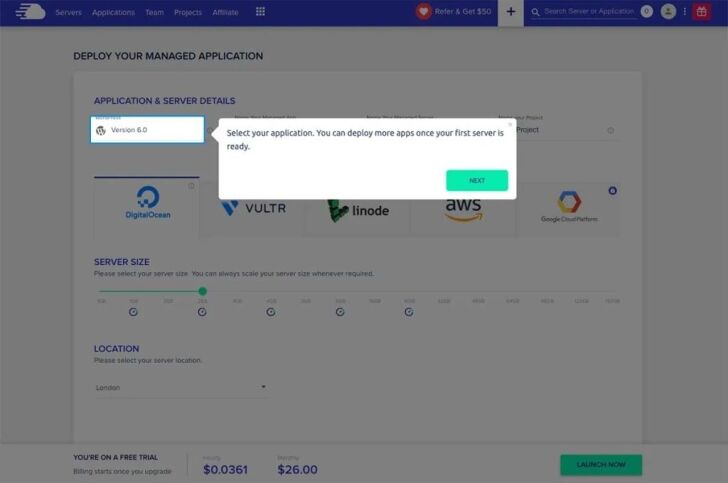
Choose the latest version of WordPress as your application.
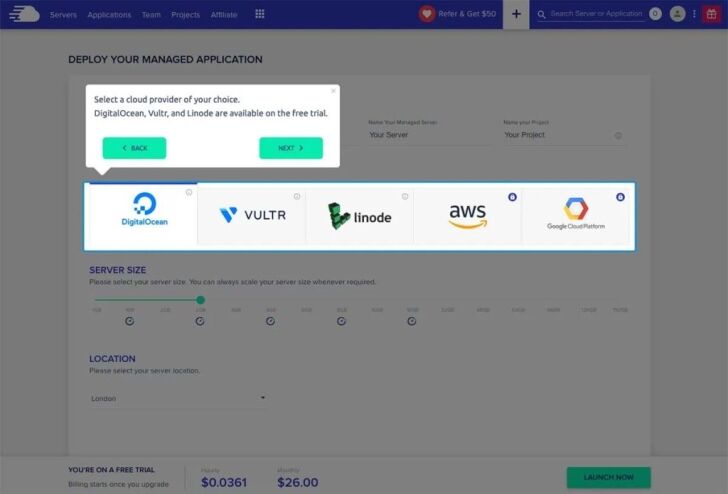
Then select a cloud provider of your choice – DigitalOcean, Vultr, and Linode are available on the free trial. We suggest using Vultr High Frequency with at least 1GB of RAM.
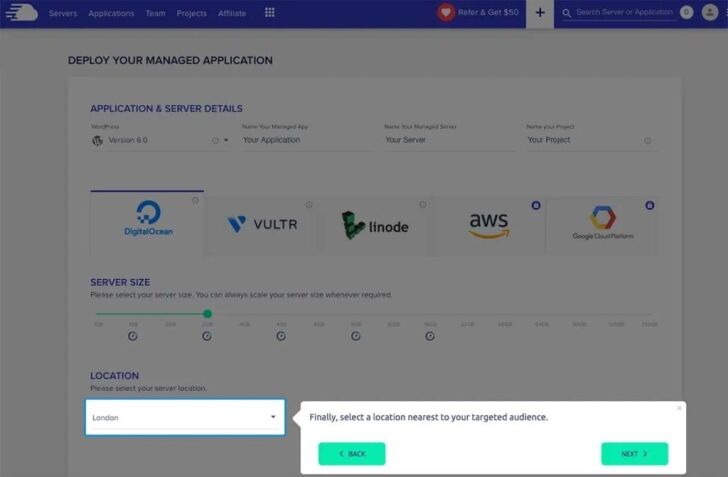
Select a location nearest to your target audience.
Then you’ll want to appropriately name your Managed App, Managed Server, and Project.
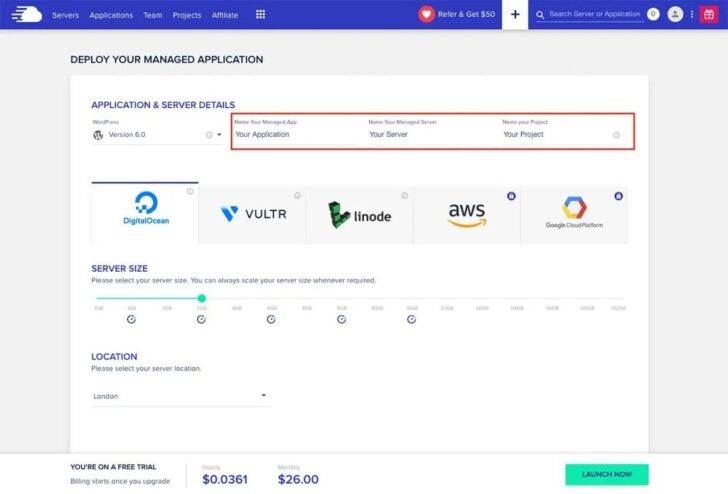
Finally, you’re ready to launch.

After three days, if you are happy with how the server works, you may start your subscription with them. Cloudways is recommended for GeoDIrectory. That’s the host for the GeoDirectory demos, optimized for this kind of website.
2. Build your website out with a nice theme
After you’ve installed WordPress, you have to decide how it will look. It’s crucial to pick the right theme for your website because users won’t leave an attractive and intuitive directory.
Remember that you can also design a beautiful website from the ground up with some of the best WordPress page builders like Gutenberg, Elementor, and Beaver Builder (just make sure they integrate with your business directory plugin).
Besides the look, there are a few other questions to ask before you pick a theme:
- How are the reviews?
- How often does the theme get updated?
- Is it going to help you rank on Google?
- Does it have responsive layouts on different screens?
- Will it work in multiple languages?
- Does it support your plugins?
3. Choosing the best directory plugin for your WordPress site
There are a ton of options when it comes to choosing a directory plugin, but GeoDirectory is most-loved because of its highly proficient, crash-resistant database (great for scaling), customizability (very developer-friendly), and integrations with beautiful themes and handy add-ons (e.g., listing prices, search filters, and mass-importing).
They actually also have a collection of official directory themes, made for their specific plugin that is customizable, extendable, and responsive. Here’s what the process looks like:
- Download and add the plugin to your WordPress site – You can download GeoDirectory free from the WordPress plugin repository or by searching for it in your WordPress dashboard.
- Publish your listing submission form – Use GeoDirectory’s intuitive drag-and-drop form builder (with over 40 field types + fully customizable form fields as an add-on) to let people quickly add listings to your business directory.
- Upload existing listings all at once – take advantage of the quick CSV import feature that lets you mass-add listings, categories, and reviews.
- Stand out faster with widgets and shortcodes – Use tools like the Google Maps widget to help businesses get found even quicker and enable advanced filters that let people find businesses based on proximity (premium add-on), rating, reviews, or date. You can also highlight certain listings for their status or value with the built-in badge system.
- Easily manage all your listings – From the WordPress backend, you can quickly moderate, edit, feature, or delete listings – and with the add-on CSV exporter tool, you can export all of your listing data as a .csv file for safekeeping.
Time to make money: 4 ways to monetise your directory website
As your website’s traffic starts to increase, so does your conversion potential – and this will make companies want to submit more content because they want the exposure. You’ll feed this need in exchange for money. Here’s how.
Wait: How do I manage users & payments for my directory website?
The first question you need to answer is: How will you get paid? And then, how will you manage the people trying to leverage your website directory’s traffic?
There are a few ways to collect payments, but the best way is through the GetPaid plugin, which automatically integrates with GeoDirectory so that you can manage invoices, taxes, VAT, and payments hassle-free. It’s secure with an extensive list of payment gateways, including PayPal, Stripe, and credit card options.
To register users to your directory, allow them to engage through posts and comments, and give them different roles and capabilities, you should use the free UsersWP plugin. It’s lightweight and integrates flawlessly with GeoDirectory.
Don’t worry. We’ll show you exactly how to leverage both of these WordPress plugins through some of the examples below.
1. Offer paid listings
One way to make money from your directory website is to offer paid listings, and there are a few different models you can choose from:
Pay-per-listing. This is where businesses pay you a one-time fee to have their listing published on your directory website – be it a top listing or just to have a spot. The listing will stay up until you delete it or the business asks to remove it.
Recurring payments. With this model, businesses pay you a recurring fee (monthly, yearly, etc.) to keep their listing published on your directory site.
Commission-based. This is where you only get paid when a lead or sale is generated from your directory listing. So, for example, if a business pays you $10/month for their listing and someone buys a product through your website, the business would then pay you an extra commission fee. (GeoMarketplace add-on required)
No matter which paid listing option you decide to offer if not all, the payments plugin GetPaid can get you set up with the one-time fees for the initial listing publication, handle the recurring subscriptions for any ongoing listing deals, and, with the GeoMarketplace or the Events Ticket Marketplace add-ons you can earn commissions from sales.
Make sure you have a proper signup process that collects important information like the owner’s full name and contact. Hence, you know exactly who’s publishing listings and doing business with you (that’s where UsersWP comes into play).
2. Offer up advertising space
Another way to make money from your business directory is to offer advertising space on your website. This works well if you have high traffic and businesses in your industry are constantly looking for new ways to reach their target market.
Find out what’s bringing users to your website and if there are relevant products you can sell using tools like Google Analytics. For instance, if users come to your website looking for builders for their new pool, maybe there are other things they’ll be interested in buying, like swimming gear. Then you can use this to pitch swimming-related companies on the benefits of advertising with you.
Don’t forget to take advantage of Google Adsense, which automatically places the most relevant, high-quality adverts on your website. You can google how to integrate both Google Analytics and Adsense into your WordPress site.
Using GetPaid to set up your ads
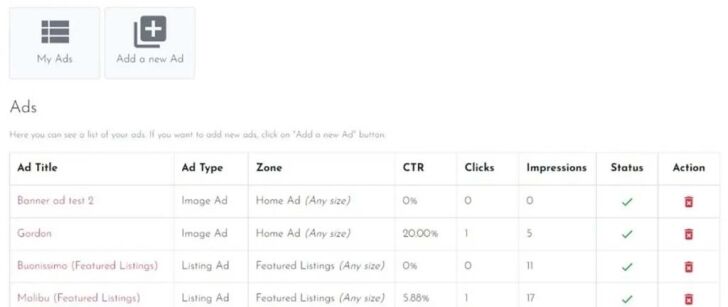
GetPaid has a handy Advertising add-on that lets you easily manage ads (whether that’s Hosted ads or display ads from 3rd party networks like Google Adsense) and place them anywhere on your WordPress website.
With GeoDirectory and the pricing manager, you could include an ad zone inside a premium listing package. You can then display this special listing in other zones of your website when someone buys this listing package.
A good example would be to add a GeoDirectory ad zone on top of the normal results to get a SERP that looks like a Google Search with organic and paid results.
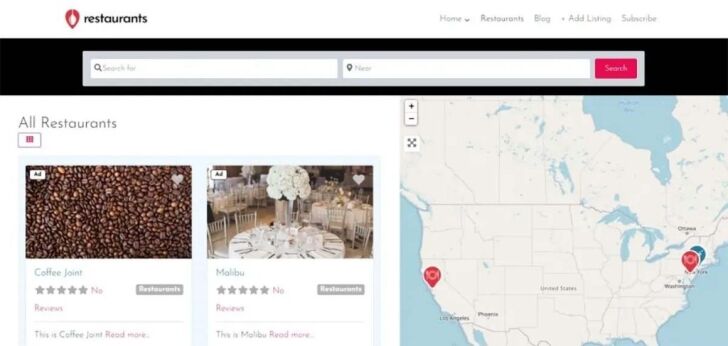
Don’t forget to add pricing options too. You can sell Ads by Number of impressions, clicks, or by time on your website.

You also get a comprehensive ad dashboard that lets advertisers create new ads and manage existing ads, giving them statistics and reports.
3. Use affiliate marketing
Affiliate marketing is a great way to make money from your directory website because it’s a win-win for you and the businesses you’re promoting. Essentially, you’re acting as an intermediary between businesses and consumers – you promote a product or service on your website, and if someone buys it, you get a commission.
For example, let’s say you have a directory website for pet-friendly businesses in your city. You could find businesses that sell pet products (e.g., food, toys, beds, etc.) and promote their products on your website’s blog posts using affiliate links. Then, if someone buys something from the business you’re promoting, you get a commission.
The key to making affiliate marketing work for you is ensuring the products or services you’re promoting are relevant to your target market and that you’re providing value with your recommendations.
4. Offer premium memberships or subscriptions
You’ll be able to charge both listers and users once your website becomes a reliable source of listings. There are a lot of potential customers on your site – listers will want access to them. So, they’ll pay for privileges like posting more listings without expiration, getting featured on your homepage, or having a badge next to their listing that says “verified” or “trusted.”
In the same way, customers may pay to see your best deals. Or, you can let users see all your listings but only let them see the contact details if they’re paid members.
GetPaid lets you create quotes that outline the details of your subscription offer to send to clients. When the customer accepts them, they automatically turn into invoices saving you time while keeping everything on record.
5. Sell event tickets
Suppose your directory website is for events, which you can achieve by using the free Events Calendar add-on for GeoDirectory. In that case, you can also sell tickets using the Events Ticket Marketplace add-on and take a cut of the profits. This is a great way to make money from your website because it doesn’t cost you anything to set up.
When an event is created, the organiser can set a price for the tickets and choose how many they want to sell. As the site admin, you earn a commission for each ticket sold through your website.
Ready to get started?
Starting a money-making directory website doesn’t have to be complicated. It can be pretty easy with the right tools, as seen in this blog post. By now, you should know how to use WordPress plugins like GeoDirectory, GetPaid, and UsersWP to create a powerful and profitable directory website.
Are you ready to make your own now? Good luck!
- Custom web design
- Secure and fast website solution
- Full management training
- Take control of your website
- SEO optimisation
- Reliable web hosting and emails
Article by Pankaj Shah: DCP Web Design Barking



