

When you are starting a new business, one of the first steps is to register a new domain name.
Trying to find the perfect domain for your business website can sometimes be a tricky task. It’s a good thing that most hosting companies and domain registrars make this process simple by following a few simple steps.
I have personally purchased many domains over the years for my own business ventures and for clients, but I would also recommend my clients purchase domains directly so they have full control.
The aim of this article is to guide you through my favourite ways to buy domain names.
Guess what! One of those methods will get you a domain name for free for the first year!
In this article, I will show you a few different domain providers I use to purchase domains and the processes required.

How to buy a domain name with Bluehost
Bluehost is an amazing website hosting provider with more than 2 million websites hosted across the internet.
Website hosting is used to store the files for running your business website, like WordPress for example.
If you use Bluehost for web hosting then you can also claim a free domain name for 1 year.
If you are a new business and just starting out, then you can use a Bluehost hosting plan and domain registration package features. This is a good option as your hosting and domain will be located with the same provider which will help later if you need technical support.
- Custom web design
- Secure and fast website solution
- Full management training
- Take control of your website
- SEO optimisation
- Reliable web hosting and emails
Step 1 – Go to Bluehost.com
In this first step simply go to Bluehost.com where we will start the setup process.
In the top navigation select the “Hosting” option.
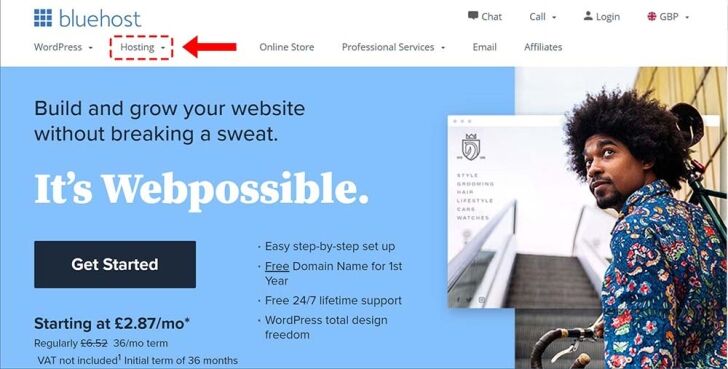
Note: To get the free domain you need to purchase a hosting plan. You can purchase a domain separately but then you will still need hosting anyway, so better to select the hosting plan option and get the domain for free!
Step 2 – Select a Hosting Plan
Bluehost provides three different types of hosting:
- Shared Hosting
- Dedicated Hosting
- VPS Hosting
Shared hosting for a start-up business is the best low-cost option. Remember you can always upgrade your hosting if required at a later date to more powerful VPS or Dedicated hosting.
Select the “Shared hosting” option from the drop-down menu for now.
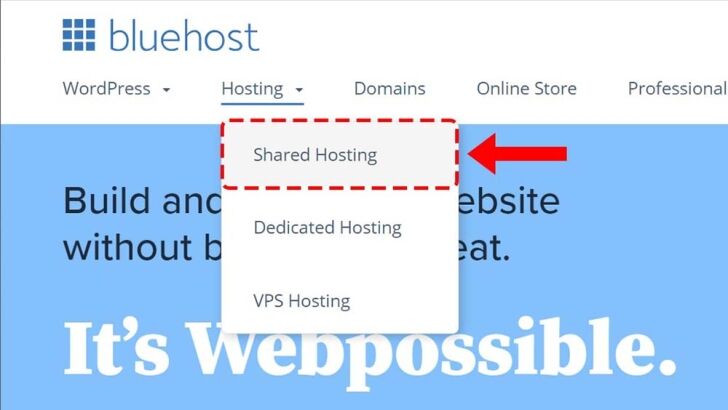
Bluehost offers four different types of shared web hosting plans
- Basic
- Plus
- Choice Plus
- Pro
The basic hosting is good for a small personal website which only costs £2.87 per month. I would recommend choosing the Choice Plan if you are launching a business website as this will give you extra features and most importantly free automated backup for 1 year.
The cost difference between the Basic and Choice plan is small so simply click the “Select” button for the plan which best fits your requirements.
Step 3 – Registering Your Domain
Now that you have selected your hosting plan, Bluehost will direct you to the next step where you can register your new domain name.
Tip: Register.Domains also provides a straightforward way to search for available domains and register popular extensions such as .com or .co.uk
In the domain registration step, you will see the following options.
- Create a new domain
- Use a domain you own
To get your free domain you will need to use the “Create a new domain” option.
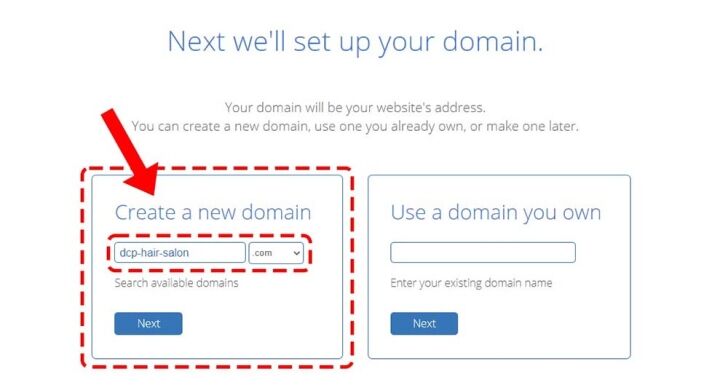
First, you need to type in the domain name you want to register in the text box.
Next to the text box is a drop-down menu where you can select the domain extension.
I would recommend selecting the .com domain extension as this is a popular extension and commonly used by most businesses.
If your selected domain is already taken, you will see a message box pop up requesting for you to choose a different domain.
For example, if you tried to register hair-salon.com then most likely this domain will already be taken.
Tip: You can add your initials at the start of a domain that normally will not be already registered, for example, dcp-hair-salon.com
If the domain is available, Bluehost will display a green confirmation and take to you the next step.

Step 4 – Create your Bluehost user account
In the final step, you will need to fill out your personal / business information.
To get the best price on hosting you will need to select the 36-month option. There is a dropdown menu where you can choose a shorter hosting term but this will also increase the cost slightly.
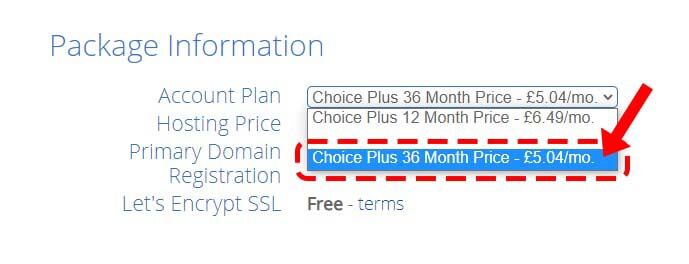
If you are based in the UK then domain privacy should be free of charge to comply with GDPR regulations.
Bluehost offers some additional package extras which you can select if required. I would recommend enabling the “SiteLock Security Essentials” to help protect your website from hackers.
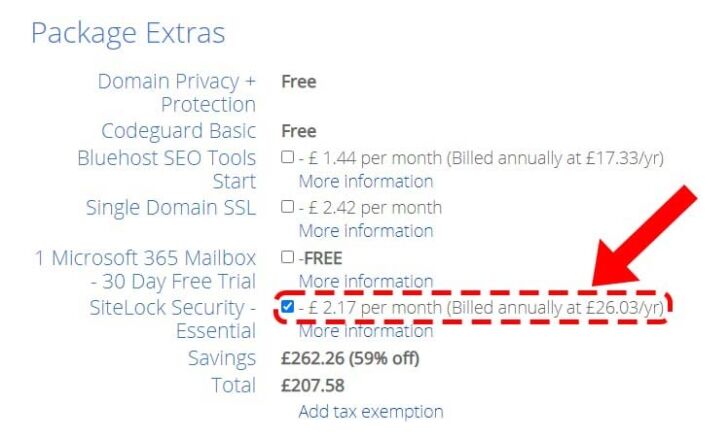
Now all you need to do is enter your payment details and claim your 1-year free domain name!
- Custom web design
- Secure and fast website solution
- Full management training
- Take control of your website
- SEO optimisation
- Reliable web hosting and emails
How to buy a domain name with Namecheap
Namecheap is just one of many domain name registrars, but I like using Namecheap as the process of purchasing a domain name is super simple and they often have great offers and deals to help save you some cost.
When I am planning a new project and first think about the website name, I then make sure a suitable domain name is available and then I create the logo design. Using this process ensures I complete the tasks in the correct order, no point in creating a new website and logo and finding out a suitable domain name is not available.
The method for purchasing a domain name on Namecheap is simpler than Bluehost as we are not purchasing hosting, only the domain name.
We can complete a domain name purchase in 3 simple steps.
Simply open your web browser and click this link to get to the Namecheap website.
Directly on the home page, you can see the search box. Simply type in your required domain.
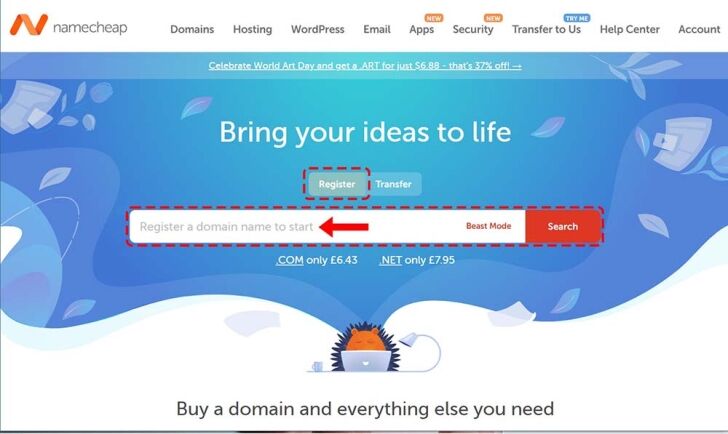
By default the “Register” button should be selected for you, this will make sure you are registering a new domain and not transferring a domain to Namecheap.
Select the search button to continue.
Step 2 – Select a domain extension
Like most other domain registrars, Namecheap also offers a wide range of domain extensions.
There are many types of domain extensions to select from like .fun, .com, .net, .io, .health, .design and many more.
Honestly, if I was you I would simply register a .com and .co.uk domain. That is nothing else.
Now simply click the “Add to cart” button next to the domain(s) you want to register.

Select the “red” checkout button located in the bottom right corner on the Namecheap website.

Step 3 – Complete your domain registration
Namecheap is the domain registration service but they also provide hosting and email services. I prefer to host a website using SiteGround as they have awesome customer service.
For Namecheap, we simply want to register the domain name(s) only, make sure you do not select any extra option like an SSL certificate, email services, web hosting or any other additional service.
On the shopping cart page, you will see a few different options for each domain.
There is an option to select the number of years you want to register the domain name for, I suggest selecting 1 year only, this way you can test your website/business idea and if it works out well then you can easily add more years later for the domain name.
I would highly recommend selecting the “Auto-Renew” option, this will make sure your domain renews automatically before the expiry date. Note you will need to log into Namecheap and disable this option later if you do not want to renew a domain name!
By default we should enable “Domain Privacy”, this option is free forever and will help to protect the information you enter when registering your name, make sure you also select “Auto-Renew”.
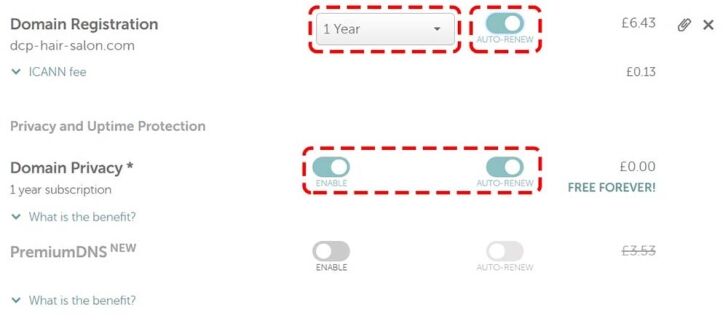
Now all you need to do is select the “Red” confirm order button.

follow the simple steps to create a Namecheap account, enter your domain Whois information and finally make your payment.
Tip – I would recommend that you create a spreadsheet and list all the domains you have registered, the domain registrar’s name, website link and date of expiry.
If need your help to point your domain to your hosting provider then speak with your website designers, give me a call and I will help for free! or check out the nameservers update guide.
Domain reigstration FAQs
What are domain name extensions?
In simple terms, domain name extensions are the end part of your domain name. For example, in the United Kingdom, the domain extension is .co.uk, in France it is .fr.
Most countries across the planet will have a unique domain extension.
If you are based in the UK then I would recommend buying both a .co.uk and .com domain name. Most people are used to typing in a .co.uk or .com extension, also you can protect your business by having both matching domain names. For example, I have registered:
- dcpweb.co.uk
- dcpweb.com
When someone types in dcpweb.com it automatically re-directs to my dcpweb.co.uk domain which is used for hosting my website.
What are new gTLDs or new domain extensions?
gTLDs are generic type Top-Level Domains that are alternative to more traditional domain extensions like .com, .net or .co.uk.
New gTLDs are mostly used to describe the core purpose of a website.
For example, you can register a domain with extensions like:
.fintess
.actor
.diet
.education
.design
The above are just a few examples of alternative domain extensions, but in most cases, I would recommend using a .co.uk or .com domain name.
How long do domain name registrations last?
In most cases when you register a domain, the default duration should be 1 year. During the registration process, there should be an option to select more than 1 year. You can also log into your control panel and extend the duration of domain registrations.
I would advise you to select the “Auto-Renew” option for your domain name(s) to make sure they never expire, the last thing you want is to lose your domain name, your website to go down and emails to stop working.
Can I buy multiple domain names?
Yes, you can!
In fact, you can buy as many domains as you like.
Some domains are restricted, like .edu or .gov domains. These types of domains are used by government organisations and educational institutes.
Tip – Don’t go domain crazy and register too many domain names. I have seen some of my clients register 20 or 30+ domains for their businesses and probably only use two of these domain names.
What is a domain name search?
When you are starting a new business, it is important that you think about the company name first. Once you know the company name you can use a popular domain registration service like Namecheap mentioned above to do a domain name search.
Domain name searching is the process of finding a suitable domain name for your company that has not already been taken by another business.
Almost all domain registration services will provide you with tools like a search box to help you find the perfect domain name.
Article created by: Pankaj Shah | DCP London Web Designers



