

If you manage a website, understanding how visitors find and use your site is essential. Two of Google’s most valuable free tools are Google Analytics and Google Search Console.
Many website owners mistakenly think these tools do the same thing. In reality, they provide different types of data and answer different questions. When used together, they provide a complete picture of your website’s performance.
Google Analytics focuses on what visitors do after they arrive on your website, while Google Search Console focuses on how your website performs within Google Search before visitors click through.
This guide explains the differences between Google Analytics and Google Search Console, what data each tool provides, and why both should be part of every website owner’s toolkit.
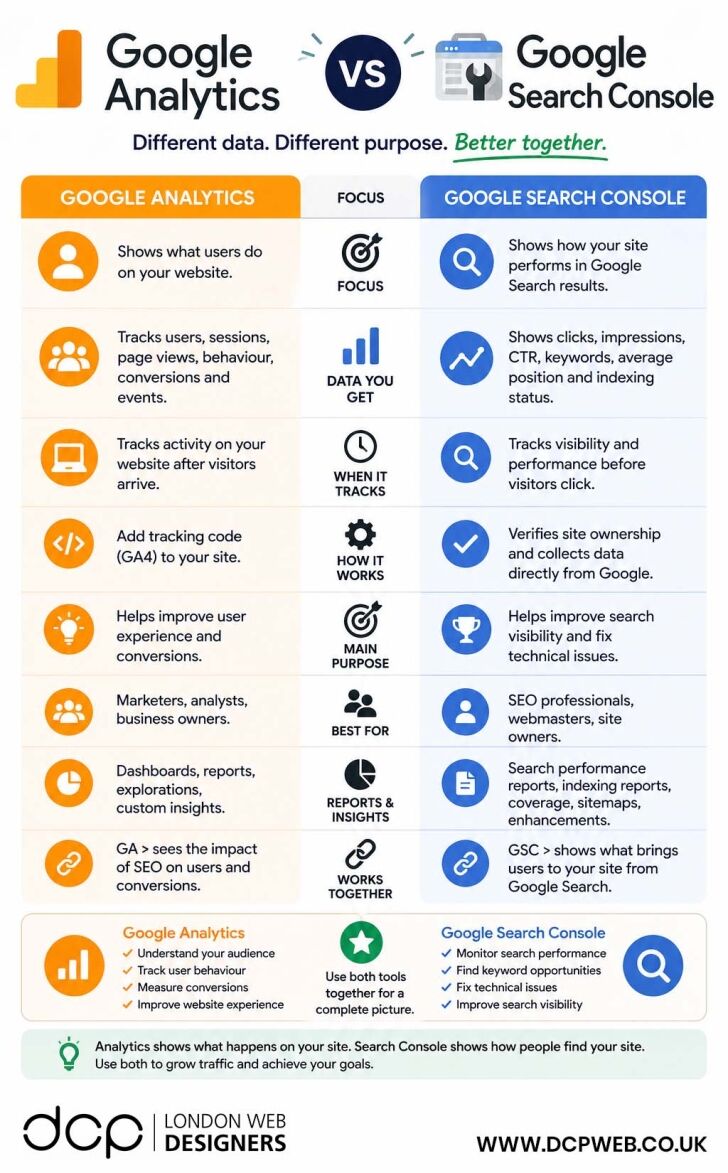
What Is Google Analytics?
Google Analytics 4 (GA4) is a website analytics platform that tracks visitor activity on your website.
It helps you understand:
- How many people visit your website
- Which pages they view
- How long they stay
- What actions they take
- Which traffic sources generate visitors
- How well your website converts visitors into customers
Google Analytics focuses on user behaviour after someone lands on your website.
Key Metrics Available in Google Analytics
Google Analytics tracks:
- Users
- Sessions
- Page views
- Engagement rate
- Average session duration
- Events
- Conversions
- Revenue
- Traffic sources
This information helps businesses improve user experience and increase conversions.
What Is Google Search Console?
Google Search Console is Google’s free SEO monitoring platform.
It provides information directly from Google’s search index and shows how your website performs in search results.
Unlike Analytics, Search Console focuses on visibility before visitors arrive on your website.
Key Metrics Available in Search Console
Search Console provides:
- Search impressions
- Clicks
- Click-through rate (CTR)
- Average keyword positions
- Indexed pages
- Sitemap status
- Mobile usability
- Core Web Vitals
- Crawling issues
This information helps website owners improve search visibility and fix technical SEO problems.
Google Analytics vs Google Search Console: Focus
The biggest difference between the two platforms is their primary focus.
Google Analytics Focus
Google Analytics answers questions such as:
- What do visitors do on my website?
- Which pages are most popular?
- Which marketing channels generate conversions?
- How many leads or sales am I generating?
Google Search Console Focus
Search Console answers questions such as:
- How visible is my website in Google Search?
- Which keywords generate impressions?
- Which pages receive search traffic?
- Are there indexing problems affecting rankings?
Both tools provide valuable insights, but from different perspectives.
The Data Each Tool Provides
Understanding the data available in each platform helps explain why both tools are needed.
Google Analytics Data
Google Analytics provides:
- User activity
- Behaviour flow
- Conversion tracking
- Traffic acquisition
- Ecommerce performance
- Engagement metrics
- Demographic information
This data helps businesses understand website performance and customer behaviour.
Google Search Console Data
Search Console provides:
- Keyword performance
- Search visibility
- Click-through rates
- Average rankings
- Indexing reports
- Crawl errors
- Sitemap reports
- Search enhancements
This data helps SEO professionals improve search engine performance.
When Each Tool Tracks Activity
Another major difference is when data is collected.
Google Analytics
Analytics begins tracking after a visitor arrives on your website.
It records:
- Page visits
- Scroll depth
- Button clicks
- Form submissions
- Purchases
- User engagement
Google Search Console
Search Console tracks activity before visitors reach your website.
It records:
- Search impressions
- Search rankings
- Search clicks
- Keyword performance
- Indexing status
This helps identify opportunities to increase organic traffic.
How Google Analytics Works
To use Google Analytics, website owners install a tracking code on their website.
The tracking code collects visitor data and sends it to Google’s reporting platform.
Typical Setup Process
- Create a Google Analytics account
- Create a GA4 property
- Install tracking code
- Verify data collection
- Configure events and conversions
Once installed, Analytics begins collecting visitor behaviour data.
How Google Search Console Works
Search Console works differently.
Instead of requiring behavioural tracking code, website owners verify ownership of their website and connect it
directly to Google.
Typical Setup Process
- Add website property
- Verify ownership
- Submit XML sitemap
- Monitor indexing status
- Review search performance reports
This gives direct access to search-related performance data.
Main Purpose of Google Analytics
The primary purpose of Analytics is to help businesses improve website performance and conversions.
It helps answer questions such as:
- Which pages generate enquiries?
- Which traffic sources generate sales?
- Where do users leave the website?
- How can user experience be improved?
This makes Analytics an essential tool for digital marketing and conversion optimisation.
Main Purpose of Google Search Console
Search Console focuses on SEO and search visibility.
It helps answer questions such as:
- Why has traffic increased or decreased?
- Which keywords generate impressions?
- Which pages are indexed?
- Are there technical SEO issues affecting rankings?
This makes Search Console one of the most important SEO tools available.
Who Should Use Google Analytics?
Google Analytics is useful for:
- Business owners
- Marketing teams
- Ecommerce managers
- Website managers
- Digital agencies
- Conversion optimisation specialists
Anyone responsible for improving website performance can benefit from Analytics data.
Who Should Use Google Search Console?
Search Console is valuable for:
- SEO professionals
- Website owners
- Content marketers
- Web developers
- Technical SEO specialists
- Digital agencies
It provides direct insights into how Google views your website.
Reports and Insights Available
Both platforms provide powerful reporting features.
Google Analytics Reports
Popular reports include:
- Acquisition reports
- Engagement reports
- Conversion reports
- Ecommerce reports
- User behaviour reports
- Custom dashboards
Google Search Console Reports
Popular reports include:
- Performance reports
- Indexing reports
- Coverage reports
- Core Web Vitals reports
- Mobile usability reports
- Sitemap reports
Together, these reports provide a complete view of website performance.
Why Google Analytics and Search Console Work Better Together
The real power comes from using both tools simultaneously.
For example:
Search Console may show that a page receives 5,000 impressions and 300 clicks from Google Search.
Analytics can then show:
- What those visitors did on the page
- How long they stayed
- Whether they converted
- Which actions they completed
Example Workflow
Search Console tells you:
- Which keywords drive traffic
- Which pages rank well
- Where visibility can improve
Analytics tells you:
- Which traffic converts
- Which pages generate leads
- Which marketing activities deliver results
Together, they provide a complete understanding of your website’s performance.
Which Tool Is More Important?
The truth is that neither tool is more important.
Google Analytics and Google Search Console serve different purposes.
If you only use Analytics, you may not understand why traffic is changing.
If you only use Search Console, you may not understand what visitors do once they arrive.
The most successful websites use both platforms together.
Final Thoughts
Google Analytics and Google Search Console are two of the most valuable free tools available to website owners.
Google Analytics helps you understand user behaviour, conversions and website performance after visitors arrive. Google Search Console helps you understand search visibility, keyword rankings and technical SEO performance before visitors click through to your site.
When combined, they provide a complete picture of your website’s strengths, weaknesses and opportunities for growth.
If your goal is to increase organic traffic, improve user experience and generate more enquiries or sales, both tools should be part of your digital marketing and SEO strategy.
DCP Web Designers is a web design agency based in London with over 20 years of experience and 300+ five-star Google reviews.



