

Front-end development combines design, coding and user experience to create the websites and applications people interact with every day. While there are countless technologies available, most successful front-end developers build their skills around a core set of tools and concepts.
This Front-End Pizza infographic presents front-end development as a pizza, where each slice represents an important ingredient required to create modern, responsive and high-performing websites. From HTML and CSS through to JavaScript, frameworks and deployment tools, every slice contributes to building better digital experiences.
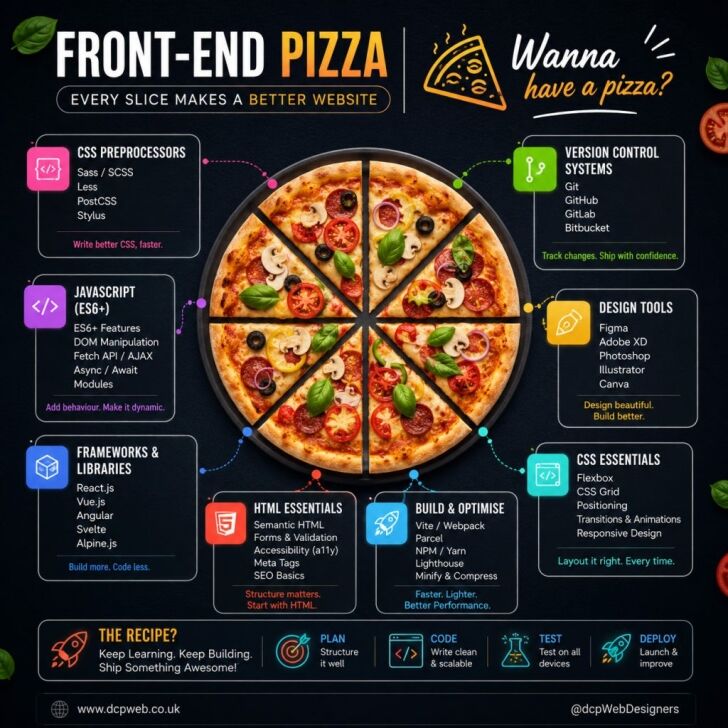
Why Front-End Development Matters
The front end is everything a visitor sees and interacts with when they visit a website. It includes layouts,
navigation menus, forms, animations, buttons and content presentation.
A well-built front end helps businesses:
- Improve user experience
- Increase website engagement
- Generate more enquiries and sales
- Improve accessibility
- Support search engine optimisation
- Create consistent branding
Modern websites must work seamlessly across desktops, tablets and smartphones, making front-end development one of the
most important areas of web design.
HTML Essentials, The Foundation of Every Website
HTML forms the structure of every web page. It provides the framework that browsers use to display content correctly.
Key HTML skills include:
- Semantic HTML elements
- Forms and validation
- Accessibility best practices
- Meta tags
- SEO fundamentals
- Content structure
Without clean HTML, websites become difficult to maintain, harder for search engines to understand and less accessible
for users.
HTML remains the starting point for every front-end project regardless of the frameworks or tools used.
CSS Essentials, Bringing Websites to Life
Once the structure is in place, CSS controls how everything looks and behaves visually.
Important CSS topics include:
- Flexbox layouts
- CSS Grid systems
- Positioning elements
- Responsive design
- Animations and transitions
- Media queries
Modern CSS allows developers to create sophisticated layouts without relying heavily on third-party tools.
Responsive design is especially important because visitors expect websites to work perfectly on all screen sizes.
JavaScript, Adding Functionality and Interaction
JavaScript powers the interactive elements users engage with every day.
Examples include:
- Navigation menus
- Dynamic forms
- Content filtering
- Search functionality
- Interactive maps
- Animations
- Real-time updates
Modern JavaScript development often focuses on ES6+ features, asynchronous programming and API integration.
A solid understanding of JavaScript helps developers build websites that feel fast, responsive and engaging.
Frameworks and Libraries Speed Up Development
Frameworks and libraries help developers build websites and applications more efficiently.
Popular options include:
- React
- Vue.js
- Angular
- Svelte
- Alpine.js
These technologies provide reusable components and development structures that reduce coding time while improving
maintainability.
Businesses increasingly rely on applications built using these frameworks because they provide excellent performance
and flexibility.
CSS Preprocessors Improve Workflow
CSS preprocessors add extra functionality to traditional CSS.
Common options include:
- Sass
- SCSS
- Less
- Stylus
- PostCSS
These tools allow developers to organise stylesheets more effectively through variables, reusable code blocks and
improved project structure.
For larger projects, preprocessors help reduce development time and improve consistency.
Version Control Keeps Projects Organised
Version control systems are essential for modern development teams.
Popular solutions include:
- Git
- GitHub
- GitLab
- Bitbucket
Version control allows developers to:
- Track code changes
- Collaborate with teams
- Roll back mistakes
- Manage deployments
- Maintain project history
Almost every professional development workflow relies on Git-based version control.
Design Tools Bridge Design and Development
Before coding begins, designs are usually created using specialist design software.
Popular tools include:
- Figma
- Adobe XD
- Photoshop
- Illustrator
- Canva
These applications help designers and developers collaborate more effectively by creating layouts, prototypes and
visual assets before development starts.
Figma has become particularly popular because of its collaborative features and developer handoff capabilities.
Build and Optimisation Tools Improve Performance
Modern websites depend on build tools that automate tasks and improve performance.
Examples include:
- Vite
- Webpack
- Parcel
- NPM
- Yarn
- Lighthouse
These tools help developers:
- Optimise code
- Compress files
- Improve loading speeds
- Test performance
- Manage project dependencies
Website performance plays a major role in both user experience and search engine rankings.
The Real Recipe for Front-End Success
The infographic finishes with a simple but powerful development process:
- Plan your project carefully
- Write clean and scalable code
- Test across devices and browsers
- Deploy and continuously improve
Front-end development is not about mastering a single tool. It is about understanding how all the ingredients work
together. HTML provides the structure, CSS creates the design, JavaScript adds functionality and supporting tools
improve workflow and performance.
When these slices come together correctly, the result is a fast, accessible and visually appealing website that
delivers a better experience for users and stronger results for businesses.
DCP Web Designers is a WordPress design agency based in London with over 20 years of experience and 300+ five-star Google reviews.



