

In an increasingly digital world, search engine optimisation (SEO) is essential for small businesses aiming to stand out online.
A high-performing, SEO-optimised website can drive organic traffic, increase visibility, and improve customer engagement—all crucial elements for business success.
WordPress, with its user-friendly design and built-in SEO features, is one of the best platforms for small businesses to build and optimise their websites.

In this guide, we’ll cover the best WordPress practices for boosting your site’s SEO and enhancing your business’s online presence.
At DCP Web Designers, we specialise in creating SEO-optimised WordPress websites to help our clients rank higher on search engines and reach more customers.
Section 1: Setting Up WordPress for SEO Success

1. Choosing an SEO-Friendly Theme
The foundation of a well-optimised WordPress site begins with selecting the right theme. An SEO-friendly theme is lightweight, responsive, and fast-loading.
Choosing a WordPress theme optimised for mobile devices is crucial, as Google prioritises mobile-first indexing.
Avoid themes with excessive design features or complex code, as these can slow down your website and negatively impact SEO.
DCP Web Designers recommends using themes that are optimised for performance and SEO, ensuring your website is fast and responsive across all devices.
2. Installing a Reliable SEO Plugin
An SEO plugin is a must-have for any WordPress site. Plugins like Yoast SEO or RankMath make it easy to add meta descriptions, keywords, and schema markup to improve your site’s visibility.
These plugins provide on-page SEO recommendations, helping you optimise each page and post to meet search engine best practices.
At DCP Web Designers, we assist clients in setting up and configuring SEO plugins to ensure their website is fully optimised for search.
3. Configuring Permalinks for Clean URLs
Clean and descriptive URLs improve SEO and make it easier for users to understand the content of your page.
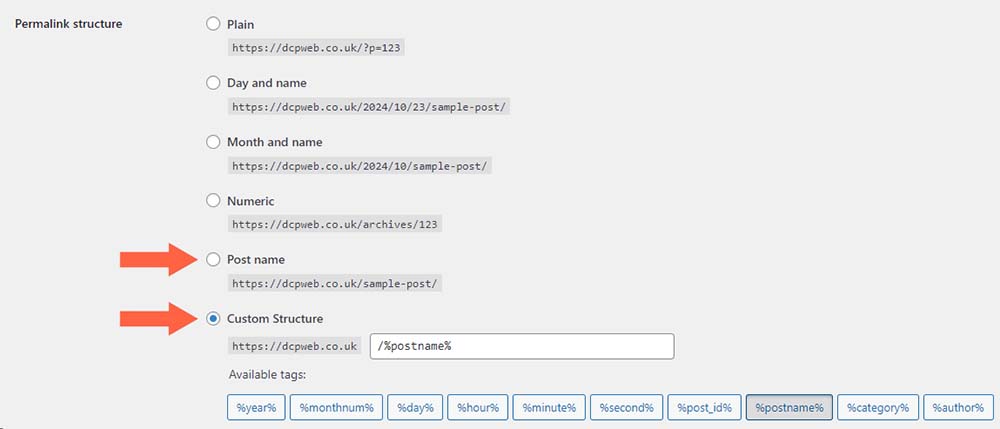
In WordPress, you can adjust your permalink settings to include keywords in URLs. Go to Settings > Permalinks and select the “Post name” option to create SEO-friendly URLs that boost your search engine rankings.
Section 2: Optimising Content for Search Engines

1. Keyword Research and Placement
Effective SEO starts with keyword research. Use tools like Google Keyword Planner or SEMrush to identify keywords relevant to your business. Incorporate these keywords naturally into your content, especially in titles, headings, and the first 100 words of the page.
Avoid keyword stuffing, as search engines prioritise high-quality, readable content.
DCP Web Designers offers content optimisation services to help you use keywords effectively without compromising readability.
2. Creating High-Quality, Engaging Content
Creating valuable content that addresses your audience’s needs is essential for SEO success. Google rewards websites that provide in-depth, relevant content with higher rankings.
Blog posts, FAQs, videos and resource pages are great ways to offer value to visitors.
Aim for original, informative content that answers common questions or solves problems related to your industry.
High-quality content keeps visitors on your site longer, reducing bounce rates and improving search rankings.
3. Optimising Headings and Subheadings
Using headings and subheadings (H1, H2, H3 tags) organises your content and makes it easier for readers to navigate.
Headings also help search engines understand the structure of your page.
Use one H1 tag for the main title and H2/H3 tags for subheadings. Including keywords in headings can further improve SEO.
DCP Web Designers ensures that each page on your website is structured for readability and SEO optimisation.
4. Using Internal Linking for Better Navigation
Internal linking connects pages within your website, creating a network that guides visitors and helps search engines crawl your site more efficiently.
Use internal links strategically to direct users to relevant content, services, or blog posts. This improves user experience and strengthens your SEO by showing search engines how your content is interconnected.
Section 3: Enhancing Technical SEO on WordPress

1. Boosting Site Speed and Performance
Page speed is a critical ranking factor, and a slow website can drive users away. Improve your site’s speed by using a caching plugin (such as WP Rocket, NitroPack or W3 Total Cache), compressing images, and minimising CSS and JavaScript.
Use tools like Google PageSpeed Insights to monitor performance and identify areas for improvement.
Our Web Designers implement speed optimisation techniques to ensure your WordPress site runs smoothly and provides a great user experience.
2. Ensuring Mobile-Friendliness
As more users browse on mobile devices, having a responsive website is essential. Choose a mobile-friendly theme and test your site on various devices to ensure optimal performance.
Google’s mobile-first indexing means mobile responsiveness can directly impact your search rankings.
Our team at DCP Web Designers prioritises mobile optimisation, making sure your website looks and performs well on all screen sizes.
3. Enabling SSL for a Secure Website
An SSL certificate encrypts data transferred between your site and visitors, providing an extra layer of security.
Sites with HTTPS are favoured by Google, and users are more likely to trust secure sites. Many hosting providers offer free SSL certificates, and installing one on WordPress is straightforward.
DCP Web Designers can handle SSL setup for you, ensuring your site is secure and SEO-friendly.
4. Optimising Images with Alt Text and Compression
Images play an important role in user experience but can also slow down a website if not optimised. Use descriptive alt tags for all images to improve accessibility and give search engines context.
Compress images to reduce file size and improve load times, using plugins like Smush or ShortPixel.
We optimise images on all of our client websites, improving performance and supporting image-based search.
Section 4: Improving Local SEO for Small Businesses

1. Setting Up Google My Business
For small businesses targeting local customers, Google My Business (GMB) is essential. A GMB listing improves your visibility in local search results and provides customers with quick access to your business information.
Ensure your listing is complete and accurate, with contact details, business hours, and customer reviews.
DCP Web Designers can help you optimise your Google My Business listing to enhance your local SEO.
2. Adding Location-Based Keywords
Incorporate location-based keywords throughout your site to target local customers. Mention your city or region in your meta descriptions, titles, and content. For example, a bakery in London might use “London bakery” or “bakery near me” as target keywords.
DCP Web Designers specialises in optimising websites for local SEO, helping you attract more customers in your area.
3. Embedding Google Maps on Contact Pages
Adding a Google Maps widget to your contact page makes it easy for customers to locate your business.
Embedding a map also signals to search engines that your business is local, which can improve your ranking in geographically targeted searches.
Section 5: Tracking and Analysing SEO Performance
1. Integrating Google Analytics and Google Search Console
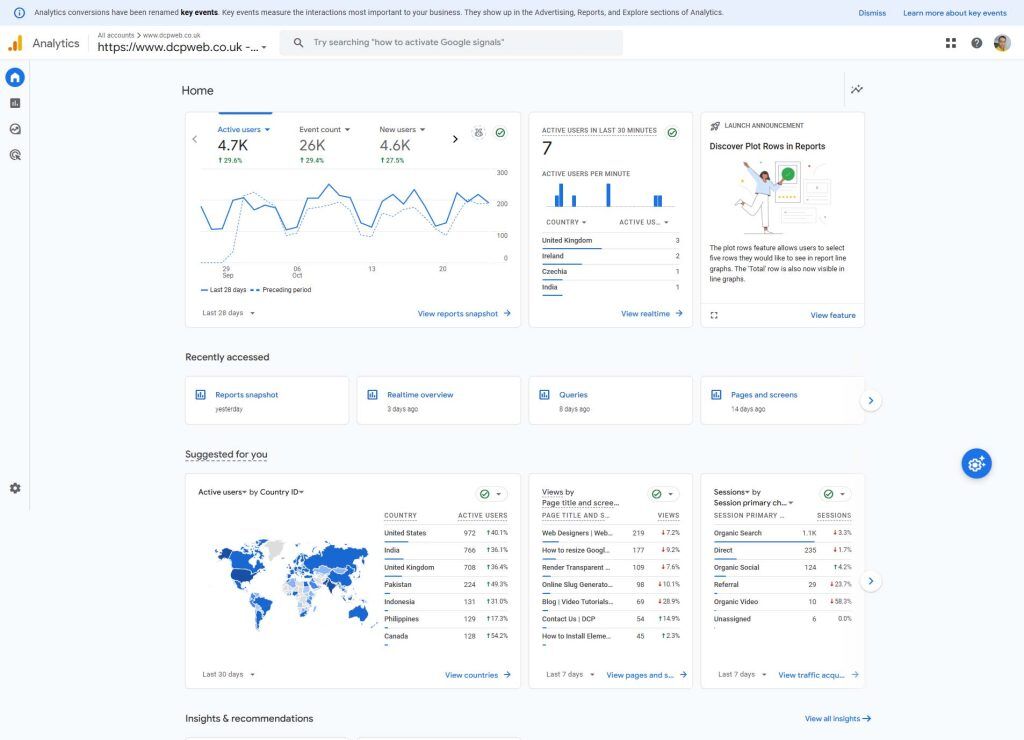
Tracking SEO performance is essential for ongoing improvement. Google Analytics provides insights into user behaviour, traffic sources, and more, while Google Search Console helps monitor search performance and identifies SEO issues.
Set up these tools to track key metrics and refine your SEO strategy over time.
At DCP Web Designers, we help our clients set up and interpret Google Analytics and Search Console data, ensuring you are informed about your site’s performance.
2. Monitoring Keyword Rankings and Adjusting Strategies
Use tools like SEMrush or Ahrefs to track how your target keywords are ranking. Regularly monitor your keyword performance and make adjustments to your content and strategies based on what works.
By keeping track of trends, you can identify which topics resonate with your audience.
Our team provides keyword tracking and optimisation support, helping you maintain visibility in search results.
3. Analysing User Behaviour for Continuous Improvement
Engagement metrics, such as bounce rate, time on page, and click-through rate, offer valuable insights into user experience. If users leave your site quickly or don’t engage with content, it may signal a need for improvement.
Regularly analysing user behaviour helps you refine your content, layout, and calls-to-action.
DCP Web Designers offers analytics services to help you optimise for better user engagement, ensuring your website supports both SEO and business objectives.
Conclusion
Optimising a WordPress website for search engines is essential for small businesses aiming to compete in today’s digital market.
By following best practices such as optimising content, improving site speed, and targeting local SEO, you can increase your visibility, attract more visitors, and drive business growth.
Partnering with an experienced web design agency like DCP Web Designers can make implementing these techniques easier and more effective.
Ready to boost your website’s SEO? Explore our WordPress Website Design services to see how DCP Web Designers can create an SEO-optimised website tailored to your business.
Visit our Web Design Portfolio to view examples of our work and get inspired for your own site.



