

Usability is an essential component of any website. As a web designer, your task is not just to design a visually pleasing website but to create one that looks good and is user-friendly.
Google’s Core Web Vitals update identifies a set of user-centred metrics that measure important aspects of user experience in real-world website usage. Put simply, usability heavily influences your website’s rankings on Google.
Building an affordable, user-friendly website that meets all SEO criteria and follows web design best practices is tricky and time-consuming. Not every business owner is willing or capable of investing large amounts of money into creating and maintaining a good website.
That’s where WordPress website builders like Elementor come into the picture. Unlike most website builders, you can design an entire theme including elements like headers, footers, 404 pages, pop-ups, blog post layouts, and much more. On Elementor, you can build an intuitive and appealing website for a client within a couple of weeks instead of months. It’s a great way to scale up your web design and development services quickly and to a higher standard.
Before we look into five advanced tactics to level up your WordPress website’s usability, let’s understand…

Why is website usability important?
Website usability refers to the ease with which an average person can use and navigate a website to achieve their goals.
Jakob Nielsen breaks down usability into five components: learnability, efficiency, memorability, errors and satisfaction. If people can’t use your website easily, they will not return. Satisfied users are more likely to convert into leads, subscribers, or customers.
In fact, 88% of online shoppers say they wouldn’t return to a website after having a bad user experience, and 70% of online businesses that fail do so partly because of bad usability.
So without further ado, let’s take a deep dive into…
5 advanced Tactics to level up your WordPress Website Usability
Here are the top five ways in which you can improve your WordPress website’s usability.
1. Reduce page loading times
Simply put, slow page loading times translate into poor user experience and higher bounce rates, thereby hurting a website’s ranking.
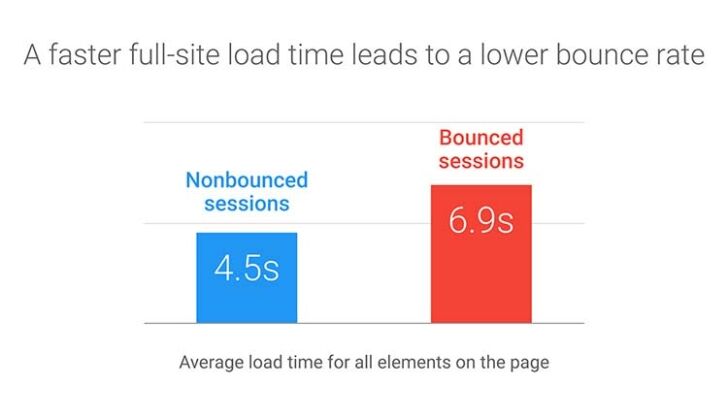
Source: Think With Google
You can improve page loading speed in several ways:
- Condense JS and CSS code – remove spaces, comments and line breaks.
- Use fast themes like Elementor’s Hello theme or WP themes like Astra and Neve.
- Use browser caching plugins like W3 Total Cache.
- Optimise bulky images with image compression tools like Smush, Imagify, and ShortPixel.
- Improve server response time by using a CDN service like Cloudflare and fast hosting.
For instance, Elementor’s team improved asset loading to make websites run faster. They changed the way the platform loads CSS, JS, and Font files to boost page speed. Elementor also eliminates the need for plugins because it has built-in widgets for important functions like contact forms, galleries, sliders, heavy images, and GIFs.
2. Make your website mobile-responsive
Today, mobile devices accounted for 54.8% of global website traffic. In response, Google’s ranking algorithms have shifted to a mobile-first index, meaning the mobile user experience, not the desktop, plays a decisive role in site rankings.
Source: HubSpot
Tips to improve your site’s mobile responsiveness:
- Reduce the number of form fields, enable autofill where possible and allow users to sign in with existing Google or Facebook accounts instead of starting from scratch.
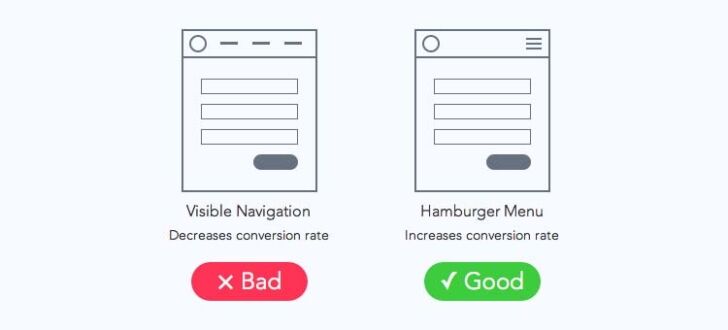
- Replace the navigation bar with a hamburger menu that can expand when required. This saves space for other important content.
- Optimise the content for one-handed use by placing primary interactions in easy-to-reach areas of the screen and less important elements to the sides.
- Disable popups as Google penalises them because it considers them “intrusive interstitials” that make content less accessible. Also, mobile users consider them annoying.
- Avoid using tiny fonts or placing touch elements too close together i.e. optimise for easy button tapping.
- Use video embedding that’s supported on all devices and HTML5 standards for animations for a good user experience.
Apply these best practices to try and ensure that your website is truly mobile-friendly and responsive.
3. Design for all screen resolutions
If your website does not display well due to the user’s screen resolution, the user is likely to leave. Thus, a lack of responsive design does not provide a good user experience.
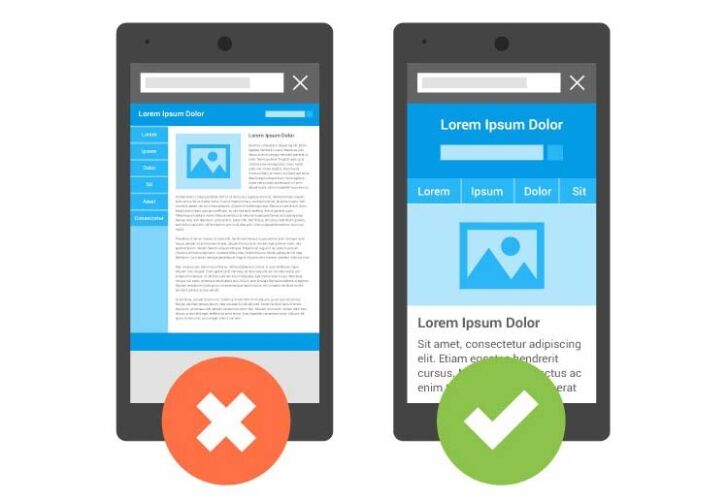
Source: Google Developers
Best practices to implement responsive design:
- Design for a few key breakpoints like small (less than 640px), medium (640px – 1007px) and large (1008 px and more)
- Create fluid designs using % units and max-widths to ensure that the layout can shift to fit the device the site is viewed on.
- Focus on reducing small-screen friction because as screens become smaller, web elements become distorted or scrambled as they have less space to render.
- Use a mobile-first design approach to include only what is necessary while providing an optimal user experience.
- Replace the need to type by leveraging functions like QR codes, GPS, or biometric IDs.
Elementor enables you to include up to 7 breakpoints for your website: mobile, mobile extra, tablet, tablet extra, laptop, widescreen, and desktop. You can choose which breakpoint will be active and the value of each breakpoint. The Elementor team also rebuilt the responsive control loading mechanism to reduce data traffic to the Editor by ~32%, server response time by ~23%, and memory usage by ~5%.
4. Use clear, simple navigation
Clear and simple navigation greatly improves a website’s usability by increasing stickiness i.e. how long users stay and explore the website. For eCommerce websites, get users to make a purchase in as few clicks as possible. Good navigational principles apply not just to the primary menu, but all the links and buttons on the website.
- Have a consistent and easily accessible navigational structure.
- Use menu bars, clickable links, and conspicuous icons to help navigation.
- Allow the addition of links in the future during updates.
- Highlight clickable text that leads users to a landing page by turning it into a button, changing colour or underlining it.
5. Use high-quality content
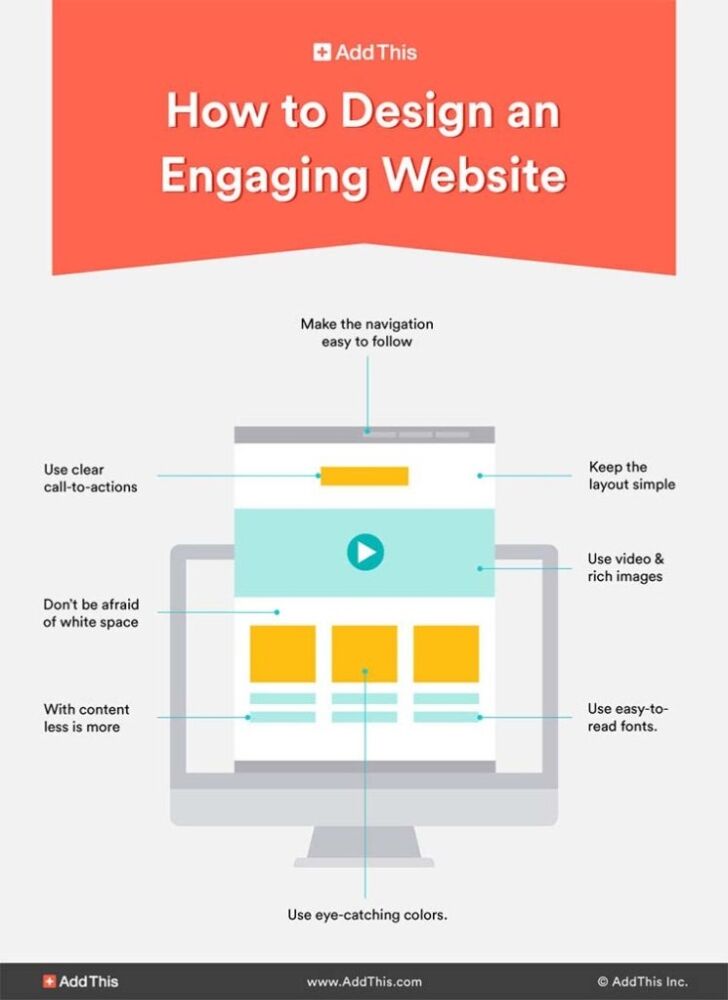
High-quality, logically organised and in-depth content improves website usability by encouraging users to engage with the content, and consequently, helps make them move down the funnel.
Source: Add This
A few pointers to keep in mind:
- Layout: Use a clean, consistent layout with lots of white spaces to improve readability. Use bullet points, lists, and different font sizes.
- Content hierarchy: Use headings and subheadings to break up chunks of text and aid scanning.
- Comprehensiveness: Create in-depth content that solves the problems of your target audience and doesn’t leave their questions hanging.
- Linking: Use a logical internal linking structure to guide users to relevant pages. Link to credible and authoritative websites. Identify and repair broken links.
- Format: Create content in a format preferred by your target audience, be it long-form blog posts, infographics, or videos.
Ask any online business owner, investing in good content creation pays dividends.
Elementor’s latest update empowers business owners with new WooCommerce widgets (Cart, Checkout, and My Account) to design unique online shopping experiences. In addition to this, the update includes Dynamic WooCommerce Tags and the Menu-Cart widget. You can also configure your WooCommerce pages faster with a new option in the Site Settings menu.
The more visually appealing and functionally optimised your website is, the more likely it is to boost conversions and generate sales.
Over to you
With these advanced tactics in hand, you can create high-quality and user-friendly websites.
Google’s ever-increasing focus on providing users with a sublime browsing experience means you cannot favour aesthetics over functionality and or overlook established principles of good UX design. Even a breathtakingly pretty website cannot rank or retain users if the usability design is poor.
Save yourself a ton of time by using a WordPress website builder that incorporates the key aspects of user experience while allowing you to edit every pixel of your website.
- Custom web design
- Secure and fast website solution
- Full management training
- Take control of your website
- SEO optimisation
- Reliable web hosting and emails
Article by Gaurav Belani: DCP Web Designers London



